Statement of Account
The Statement of Account (SOA) lists a customer's open invoices with an aging of what is past due. It is printed from the customer's contact record and opens in the i-net viewer.
Printing an SOA
-
Go to Contacts (or Sales → Orders → Customers) and open the customer.
-
Click the ⚙ (gear) next to the name → Print → Statement of Accounts.
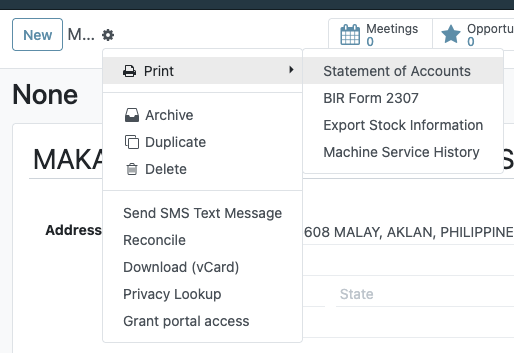
-
Set From Date and To Date and click Confirm.
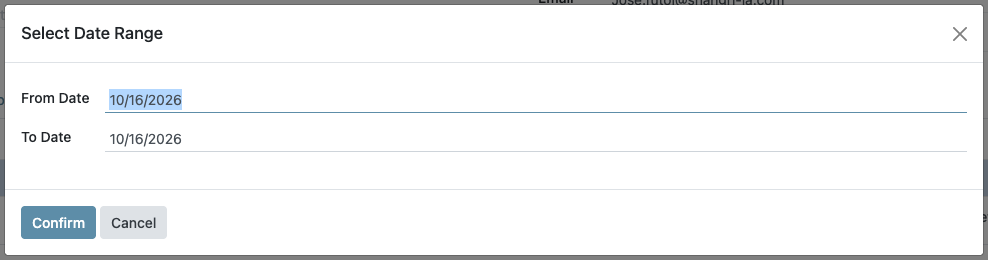
Both dates start at today, and the SOA only lists invoices whose invoice date falls between them. Set From Date far enough back to cover the oldest open invoice (e.g. 01/01/2025), or older unpaid invoices will be missing.
The SOA opens in the i-net viewer, ready to print.
What the SOA shows

- Which invoices: posted customer invoices that are Not Paid or Partially Paid, dated within From–To. Paid invoices, drafts and credit notes are not listed.
- Amount Less Payment: what is still owed on each invoice.
- Days Overdue: days from the due date to today (negative when not yet due).
- Aging columns: the open amount falls under Not Due Yet, 1-30 days, 31-60 days, 61-90 days or 91 days & above.
- Net Due: the past-due total only. Amounts not yet due are in the totals but not in Net Due.
Customers billed to a branch or invoice address
Many customers have child contacts: an Invoice Address or Delivery Address under the main company record. Invoices posted to one of those addresses belong to the main customer, and the SOA counts them:
- Printed from the main customer, the SOA includes invoices billed to the customer itself and to any of its child addresses.
- Printed from a child address, the SOA runs for the main customer, with the same result. You do not have to go back to the parent record first.
The SOA is for the customer whose record is open. Selecting several contacts in the list and printing gives the statement of the first one only.
Reference
| Concern | File |
|---|---|
| Print menu action (Statement of Accounts) | bc17/blu_base/views/res_partner_view.xml (action_server_print_soa) |
| Runs for the commercial (top-level) partner | bc17/blu_base/models/res_partner.py (print_soa) |
| Date range dialog | bc17/blu_base/models/date_range_wizard.py |
SOA layout; matches invoices on commercial_partner_id | inet/blu/partner_soa.rpt |