Delivery Orders — SLA at a Glance
Every outgoing Delivery Order in Inventory now carries the same Service Level Agreement (SLA) badge that's been on the Sales Order form for months. Warehouse and dispatch staff can see, straight from the transfer list, which deliveries are on track, which are running close to the wire, and which have already breached the customer's target window — without opening the underlying SO.
The plumbing is in common/sla_sales_tracking/models/stock_picking.py: each picking pulls its SLA from the linked sale.order via stored related fields, so the badge is computed once on the SO side and surfaces wherever you list pickings — no extra cron, no recomputation per view.
Where to find it
Inventory → Operations → Transfers (or any picking-type tile from the Inventory Overview dashboard). Open the Deliveries filter and you'll see the new SLA Status column by default:
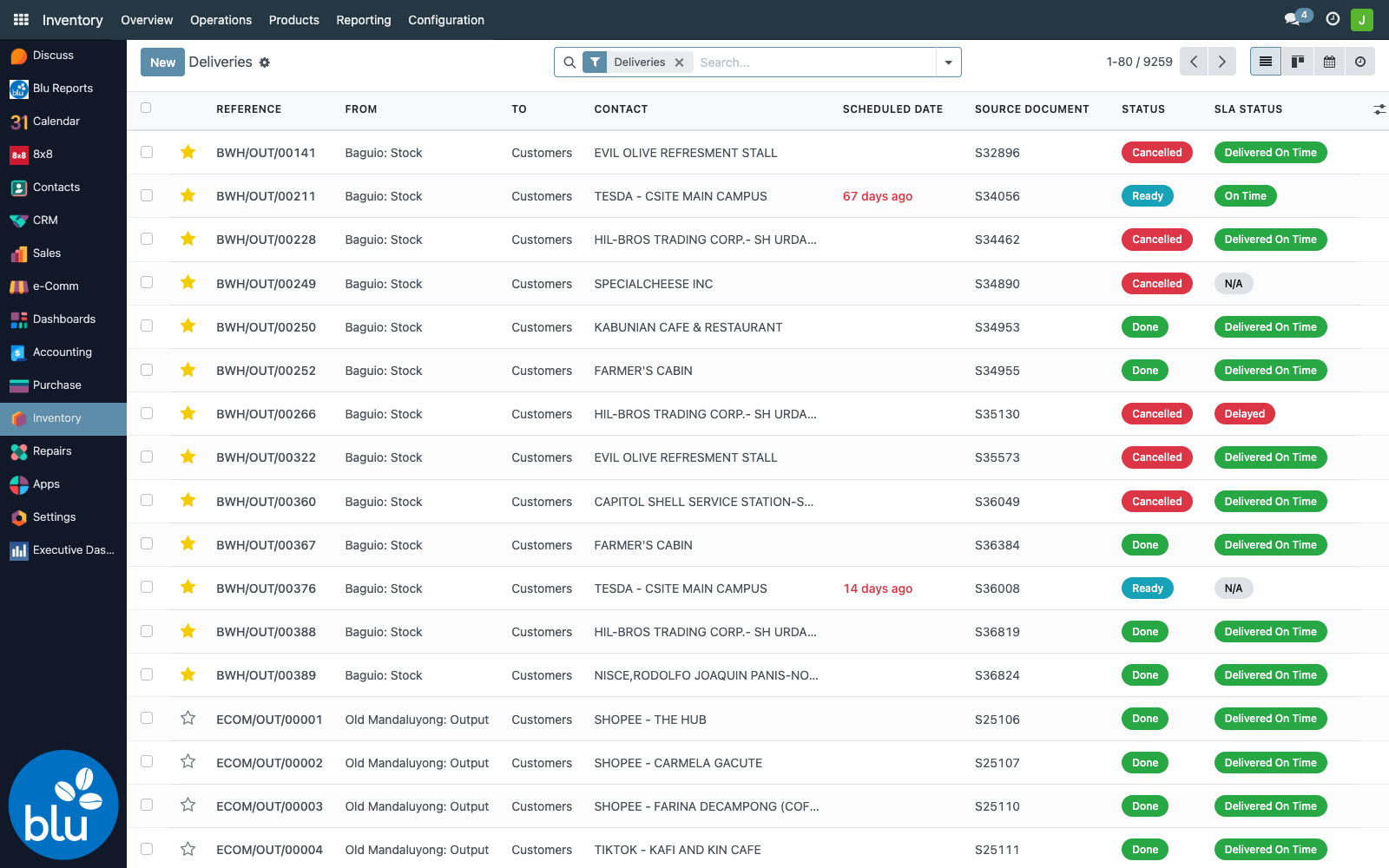
Colours match the badge convention used elsewhere in bc17:
| Badge | Meaning |
|---|---|
| 🟢 On Time / Delivered On Time | Still within SLA window with >2 working days remaining, or completed picking landed on or before the expected date |
| 🟡 At Risk | Confirmed delivery with ≤2 working days remaining |
| 🔴 Delayed | Past the Expected Delivery date with no completed picking |
| 🔴 Delivered Late | Completed picking finished after the expected date |
| ⚪ N/A | Picking has no linked SO (internal moves, manual receipts, etc.) |
Optional columns
Click the column-options icon (top-right of the tree) and toggle on SLA Expected Delivery, SLA Days Remaining, and SLA Region for a full readout per row:
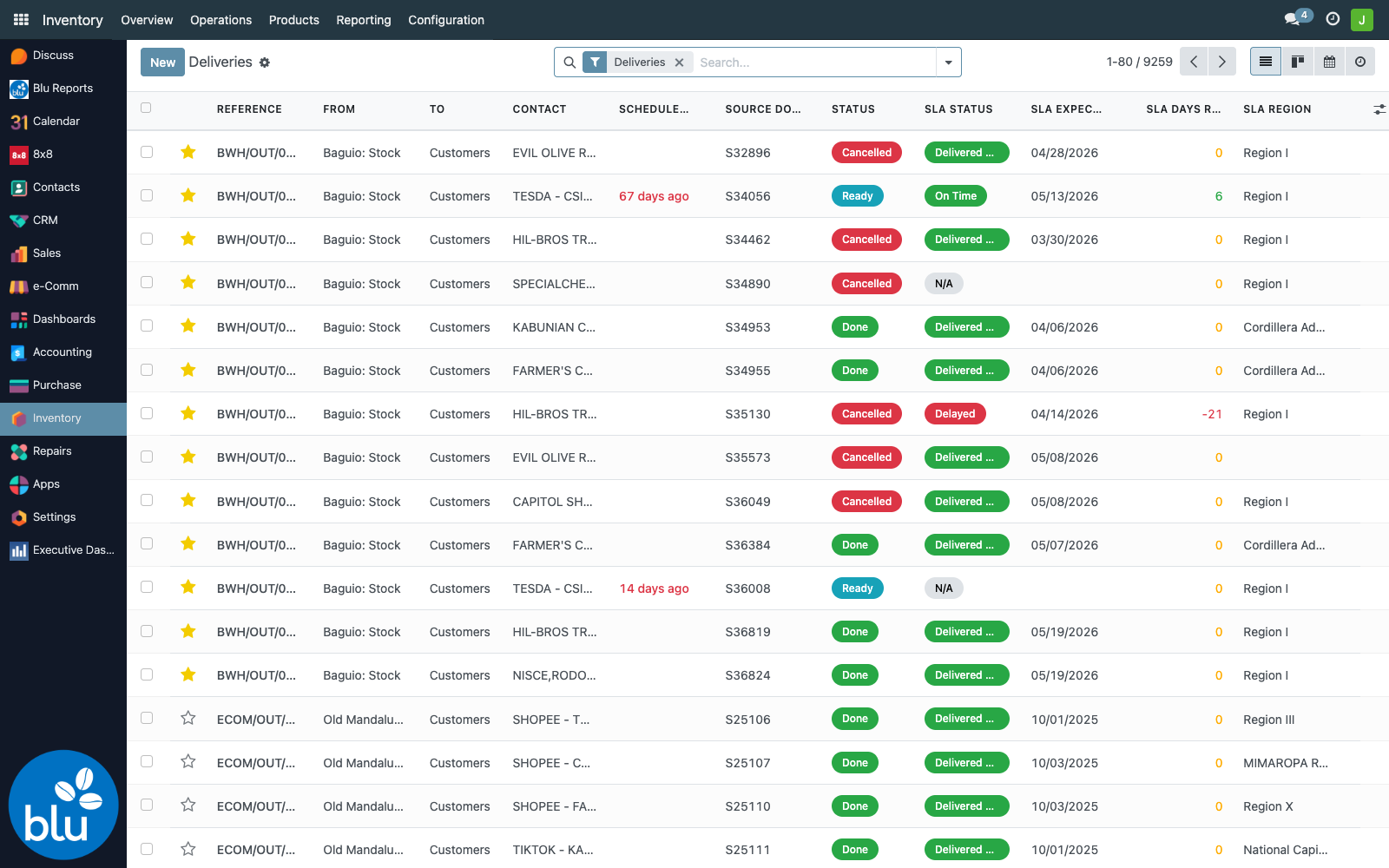
The SLA Days Remaining column is colour-coded the same way the badge is:
- Green — >2 working days to spare
- Yellow — 0–2 working days remaining
- Red — negative number, i.e. days overdue
Your column toggles are remembered per user, so once you've picked the layout you want, it sticks.
Filtering and grouping
Tap the caret on the right side of the search bar to open the search panel. The middle column lists every SLA filter and the new SLA Status group-by:
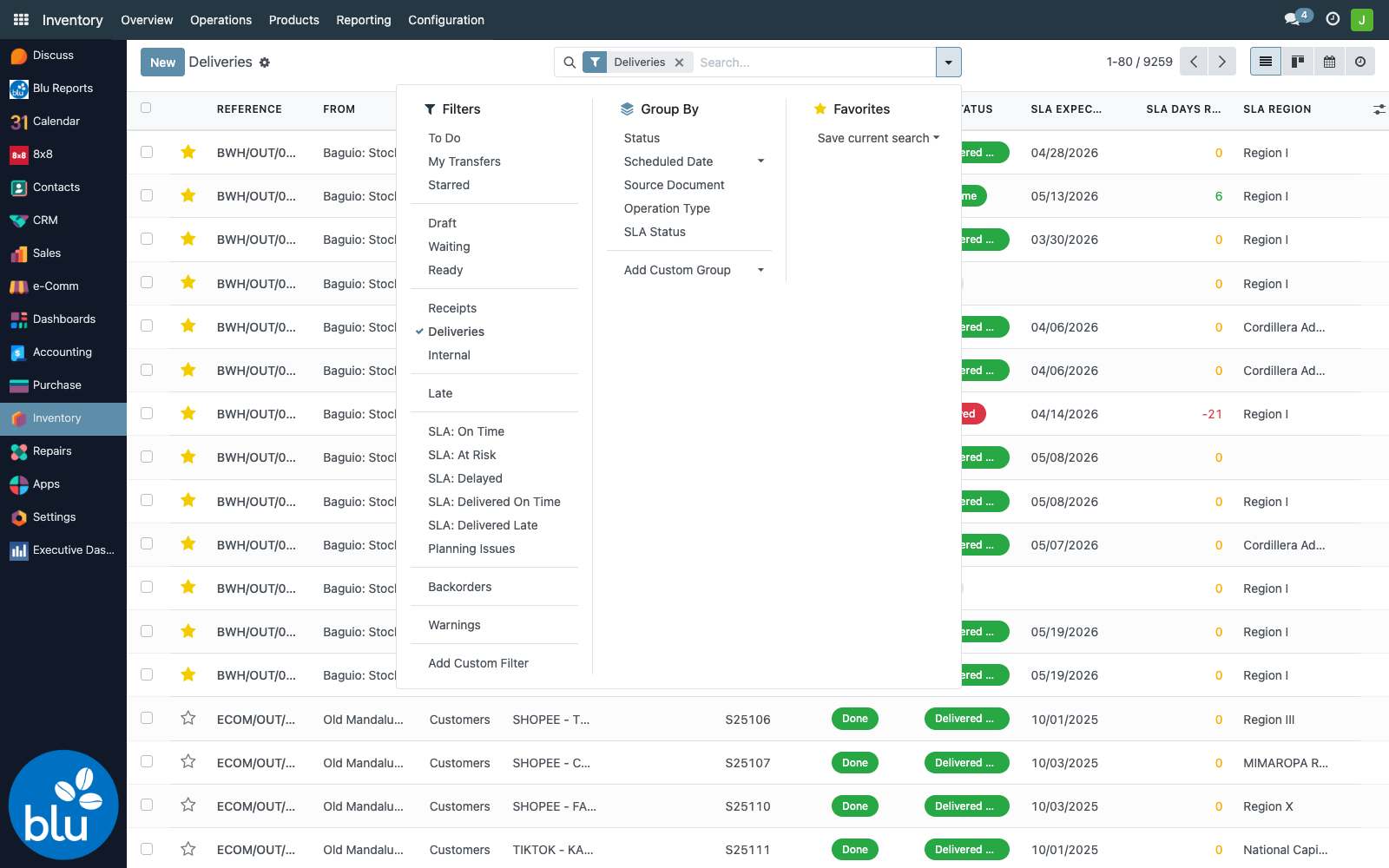
The five new filters under Filters → SLA:
| Filter | What it shows |
|---|---|
| SLA: On Time | Confirmed deliveries still within window |
| SLA: At Risk | Confirmed deliveries with ≤2 working days remaining |
| SLA: Delayed | Confirmed deliveries past Expected Delivery with no completed picking |
| SLA: Delivered On Time | Completed deliveries that hit the window |
| SLA: Delivered Late | Completed deliveries that missed it |
…plus a Group By → SLA Status that produces a clean breakdown for daily / weekly reviews:
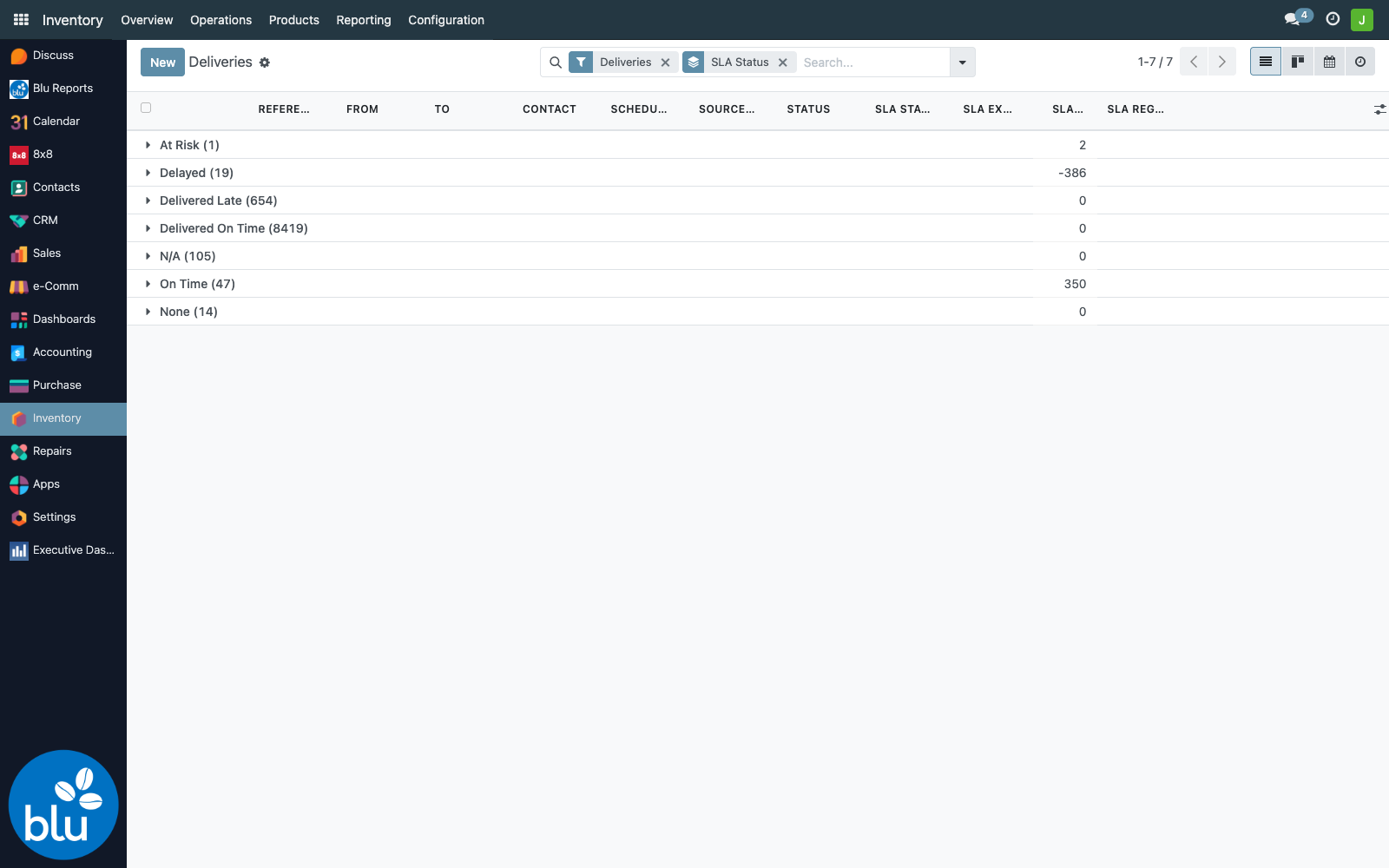
The grouped view is what dispatchers should default to in the morning — At Risk and Delayed float to the top of the alphabet, making the day's priority list self-evident.
SLA targets — driven by customer region
The number of working days each delivery is allowed comes from the customer's region via res.region.delivery_time. Current settings:
| Region | Target |
|---|---|
| NCR (Metro Manila) | 3 working days |
| Region III (Central Luzon — incl. Pampanga) | 3 working days |
| CAR (Cordillera — incl. Baguio) | 3 working days |
| Region VII (Central Visayas — incl. Cebu) | 3 working days |
| All other Philippine regions | 5 working days |
Working-day math skips weekends and entries in the sla.holiday model. The same calculation drives the SLA badge on the SO form — see Sales Order → SLA tracking for the underlying state machine and the full status-decision flow.
Pickings created outside a sale order — internal warehouse transfers, scrap moves, manual receipts — show no SLA badge (or a muted N/A). The SLA is a customer-facing commitment computed from the sale, so it doesn't apply to internal operations.
Configuration
The SLA computation has two configurable inputs and one prerequisite. Both configuration screens live under Sales → Configuration → SLA Configuration (they were authored as part of the original SO SLA module — Inventory simply consumes the results).
Step 1 — SLA days per region
Sales → Configuration → SLA Configuration → Region SLA Days opens an editable list of all 17 Philippine administrative regions. Click any SLA Days cell to edit inline:
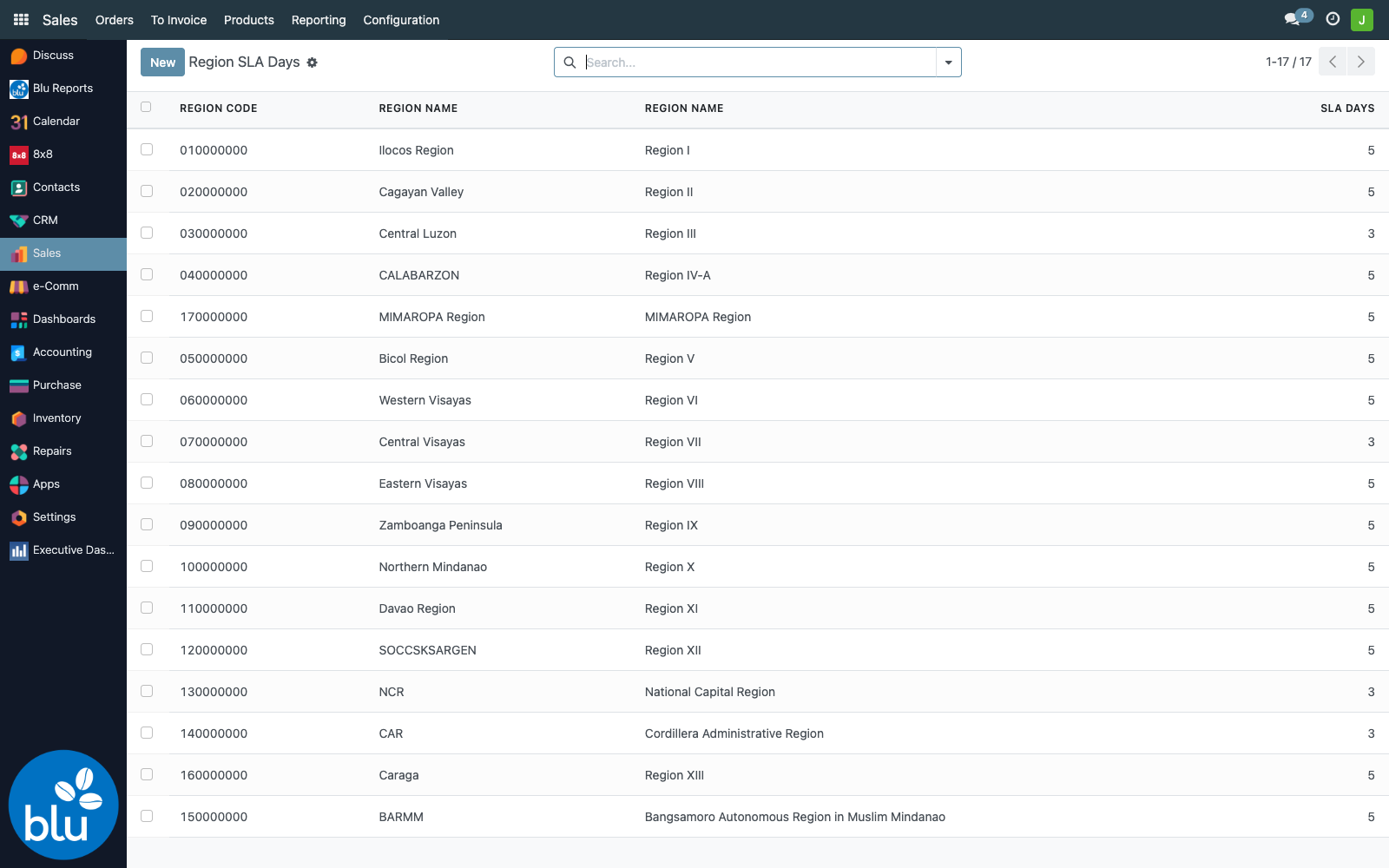
After saving, both sale.order.sla_* and stock.picking.sla_* recompute on the next save of each record. There's no separate recomputation cron — touching the region propagates to every order/delivery whose partner sits in it as those records are next read or saved.
There's no per-province override. If Pampanga (within Region III) needs a different SLA from the rest of Central Luzon, that distinction isn't expressible today — every customer in Region III gets the same number.
If a finer split becomes necessary, a follow-up would be to add an optional sla_override_days on res.partner that, when set, supersedes the region lookup.
Step 2 — Working-day holidays
Sales → Configuration → SLA Configuration → SLA Holidays lists every date excluded from the working-day math:
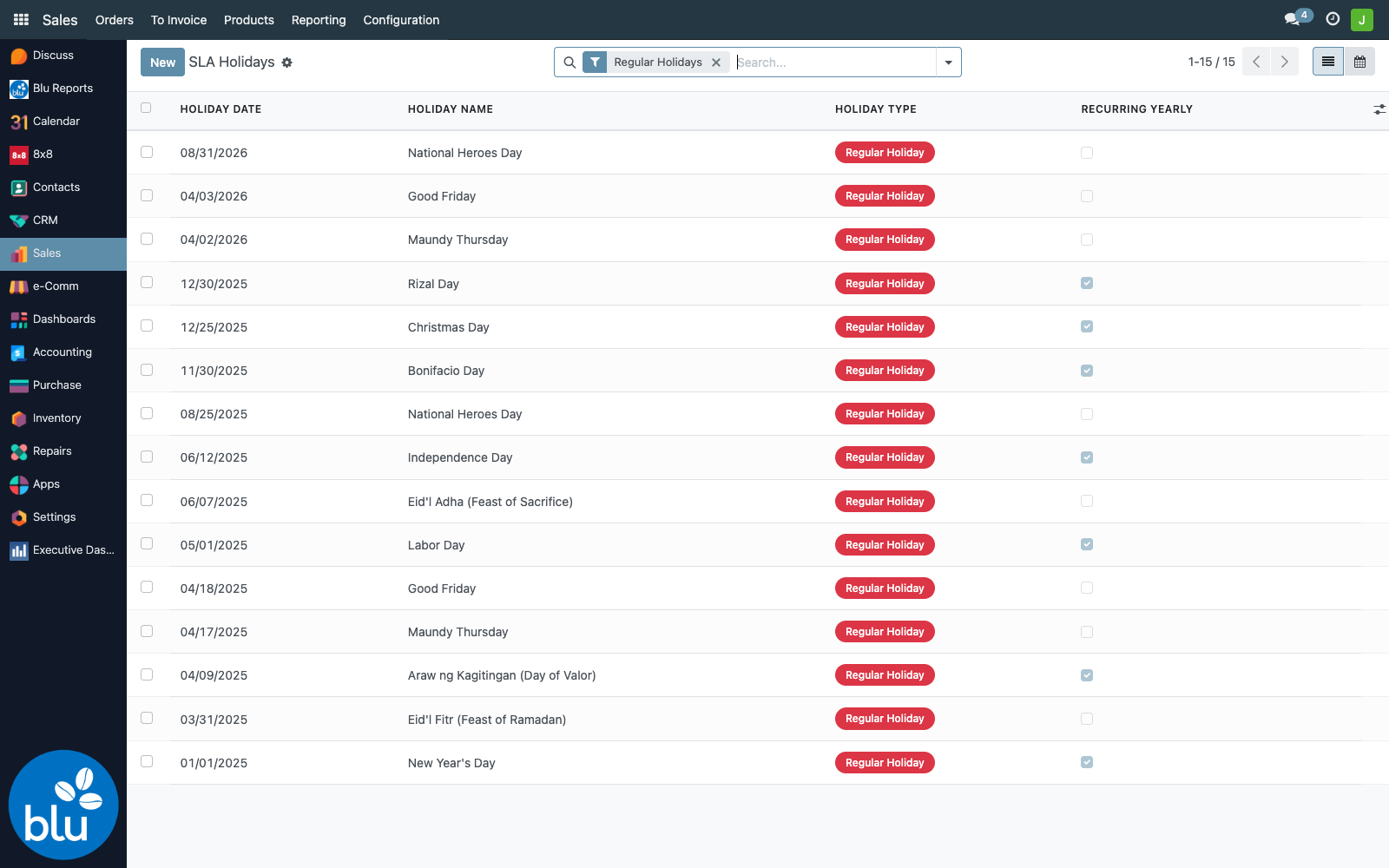
Each holiday has three knobs:
| Field | Effect |
|---|---|
| Holiday Type = Regular Holiday (red badge) | Excluded from working-day count. Use for the formal PH regular holiday roster (New Year's Day, Maundy Thursday, Good Friday, Araw ng Kagitingan, Labor Day, Independence Day, National Heroes Day, Bonifacio Day, Christmas Day, Rizal Day, Eid al-Fitr, Eid al-Adha). |
| Holiday Type = Special Non-Working Day (yellow badge) | Also excluded — use for proclaimed special days (Black Saturday, Christmas Eve, Last Day of the Year, Chinese New Year, Ninoy Aquino Day, All Saints' Day, Feast of the Immaculate Conception). |
| Holiday Type = Special Working Day (green badge) | Informational only — currently treated as a working day. Use to flag days that some establishments observe but for SLA we still count. |
| Recurring Yearly ✓ | Holiday is applied every year on the same calendar date (Christmas Day, Rizal Day, Bonifacio Day). |
| Recurring Yearly ✗ | One-time entry, applies only to the specific year (Holy Week dates, Eid dates, ad-hoc presidential proclamations). |
| Active | Archive without deleting — useful for retiring an old proclamation while preserving history. |
The list is seeded with the standard Philippine holiday roster via common/sla_sales_tracking/data/ph_holidays.xml (26 entries at install). Add one-offs (movable proclamations, election holidays, election-related special non-working days) here whenever Malacañang publishes them.
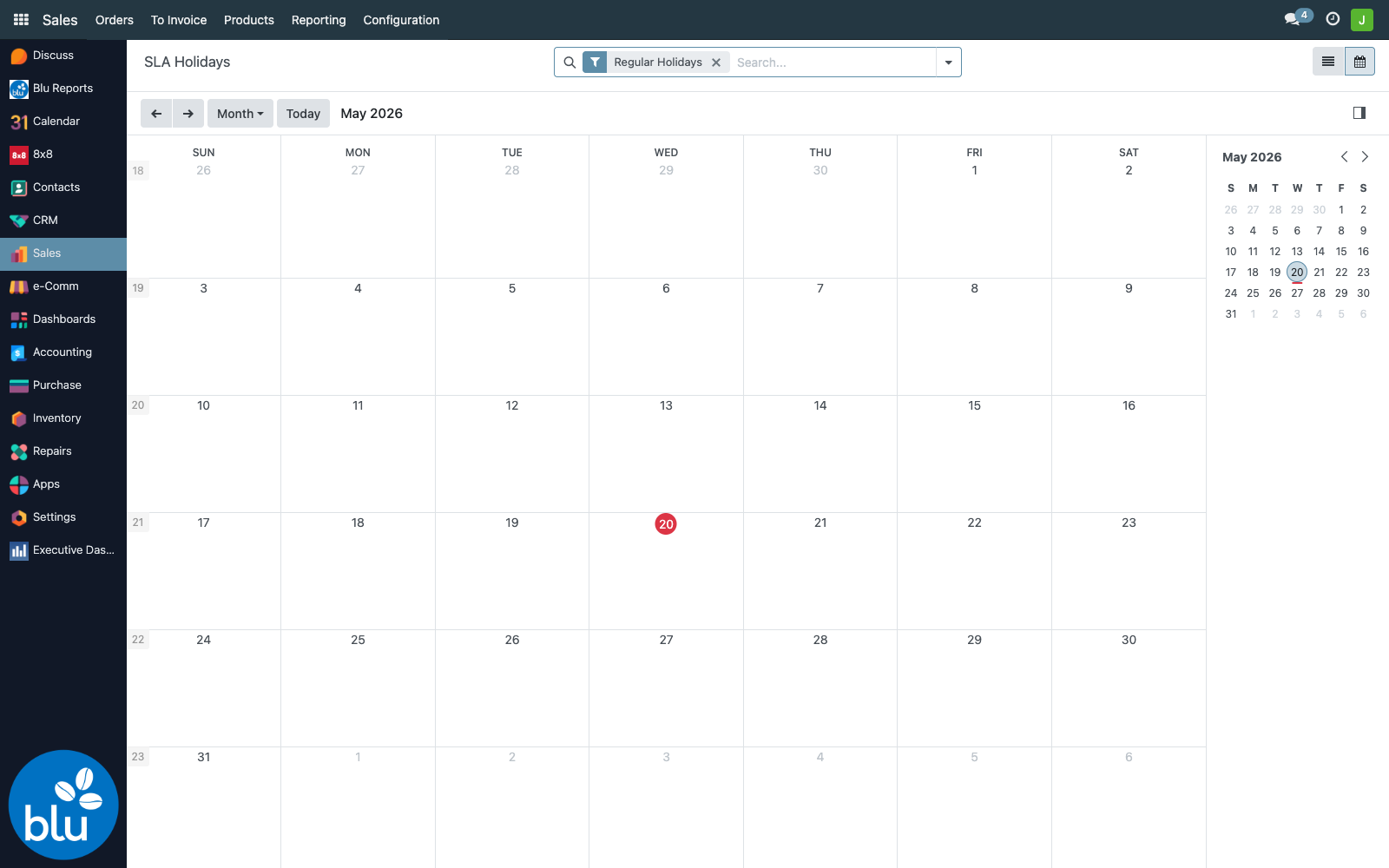
A calendar view of the same data is one click away (top-right icon) — handy for spotting clustered no-work weeks:
Step 3 — Customer regions (the prerequisite)
For any of the above to mean something, the customer record needs a region. This is set on Contacts → (customer) → Sales & Purchase tab → Region (res.partner.region_id).
Current coverage of the BluCoffee partner base:
| Customers… | Count |
|---|---|
| Total active customers | 6,444 |
| With region set | 5,029 |
| Missing region | 1,415 |
Without a region the SLA falls back to the legacy default: NCR (region code 130000000) → 4 days, everywhere else → 12 days — not the current 3/5-day spec. So a brand-new Metro Manila customer who never had their region set gets a more generous 4-day SLA than a configured one (3 days), and a brand-new Cebu customer gets a much more generous 12-day SLA than configured (5 days). Cleaning up the 1,415 missing-region partners is the single biggest lever for making SLA reporting accurate.
Open Contacts in list view, multi-select rows that share a region (filter by city/province), then use list multi-edit (click the column header → write the value → apply to all selected). Saves a few hundred clicks.
Hardcoded settings (not exposed as configuration)
Two thresholds are baked into the code rather than surfaced as settings:
- At-Risk threshold = 2 working days. A confirmed delivery flips to At Risk once it's within 2 working days of the expected date. Lives in
sale_order.py→_compute_sla_status_and_metrics(). - Region-missing fallback (NCR=4, others=12). Used when a partner has no
region_id. Same file —_compute_sla_fields(). The fallback predates the current 3/5-day spec; ideally cleaning up partner regions removes the need for it entirely.
To change either, edit the Python and restart Odoo — --stop-after-init updates DB/views only, not Python code.
Reference
| Concern | File |
|---|---|
stock.picking SLA fields (related → sale_id) | common/sla_sales_tracking/models/stock_picking.py |
| Tree-view inherit + badge decorations | common/sla_sales_tracking/views/stock_picking_views.xml |
| Search-view inherit (filters + group-by) | common/sla_sales_tracking/views/stock_picking_views.xml |
| SO-side SLA computation | common/sla_sales_tracking/models/sale_order.py |
Region SLA targets (delivery_time) | res.region model in bc17/blu_base/models/ph_region.py |
| Working-day / holiday lookup | common/sla_sales_tracking/models/sla_holiday.py |
Custom stock.picking fields
| Field | Type | Source |
|---|---|---|
sla_status | Selection | related sale_id.sla_status, stored |
sla_target_days | Integer | related sale_id.sla_target_days, stored |
sla_expected_delivery_date | Date | related sale_id.sla_expected_delivery_date, stored |
sla_days_remaining | Integer | related sale_id.sla_days_remaining, stored |
sla_region_name | Char | related sale_id.sla_region_name, stored |