8x8 Viber, SMS & AI Chatbot
Blu Coffee's outbound marketing and customer-engagement runs on 8x8 CPaaS. The integration covers three things:
- Viber marketing campaigns — the primary marketing channel. Send a single message to a curated audience, with delivery tracked per recipient.
- An AI (ChatGPT) chatbot — answers public Viber inquiries grounded in a curated FAQ knowledge base.
- Intent-driven CRM lead capture — when the AI judges that an inbound message shows buying intent, it auto-creates a CRM lead and pings every member of the sales group via Viber to claim it.
The features live in two cooperating Odoo modules:
| Module | What it provides |
|---|---|
common/blu_8x8/ (the 8x8 app) | Viber campaigns, ChatGPT integration, AI training data, webhook receiver, settings page |
bc17/blu_8x8/ (sub-package of bc17) | SMS sender-account selector on the standard Odoo SMS composer |
This page documents the marketing-campaign workflow end to end, then the AI chatbot and the intent→lead handoff.
The 8x8 app
The 8x8 app appears in the apps menu for users in the Viber Messaging Administrators group. It exposes two top-level sections:
| Menu | What | Group required |
|---|---|---|
| Viber → Campaigns | The campaign list + form (this is where marketing work happens) | Viber Messaging Administrators |
| ChatGPT → Training Data Model | The Prompt/Completion pairs that feed the AI chatbot | Viber Messaging Administrators |
The Can handle CRM from Viber and AI? group is separate — its members receive the "claim this lead" Viber buttons whenever the AI detects buying intent.
Configuration — 8x8 + ChatGPT settings
All keys, sub-accounts, and the ChatGPT toggle live under Settings → 8x8 (general settings, "8x8" tab on the left).
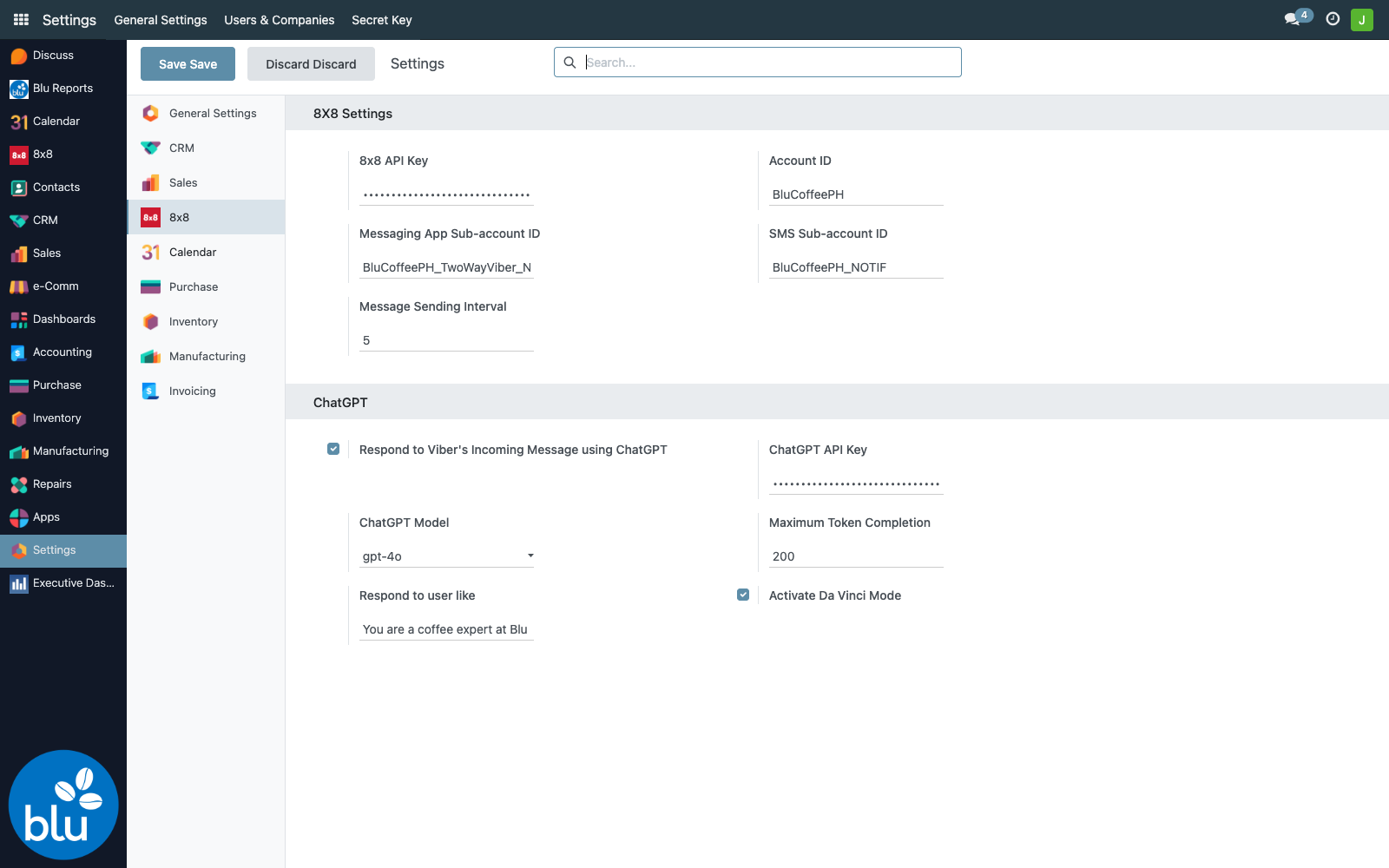
| Setting | Purpose |
|---|---|
| 8x8 API Key | Bearer token used to authenticate every outbound call to 8x8 (Viber + SMS) and every webhook callback. Stored in ir.config_parameter key blu_8x8.blu_8x8_api_key. |
| Account ID | 8x8 account display name (e.g. BluCoffeePH). Informational. |
| Messaging App Sub-account ID | The Viber sub-account (e.g. BluCoffeePH_TwoWayViber_NOTIF). All Viber API calls hit https://chatapps.8x8.com/api/v1/subaccounts/<this>/messages. |
| SMS Sub-account ID | The SMS sub-account (e.g. BluCoffeePH_NOTIF). |
| Message Sending Interval | Seconds between each outbound message in a campaign. Acts as a soft rate limit — 5 (the default) means one Viber every 5 seconds, ~12/minute. |
| Respond to Viber's Incoming Message using ChatGPT | Master switch for the AI chatbot. When off, inbound messages are stored but not auto-answered. |
| ChatGPT API Key | OpenAI API key. Stored encrypted; UI shows dots. |
| ChatGPT Model | The OpenAI model used. Default gpt-4o. Selectable: gpt-4o, gpt-4o-mini, o1, o1-mini, gpt-4-turbo, gpt-4-turbo-preview. |
| Maximum Token Completion | Cap on AI response length. Default 200. |
| Respond to user like | System-prompt persona prefix. Default "You are a coffee expert at Blu Coffee Distributors." |
| Activate Da Vinci Mode | When on, every inbound message also goes through the intent detector — the AI gates each message ("is this showing interest in coffee?") and routes "Yes" messages into the CRM-lead flow. |
Respond to Viber's Incoming Message controls whether the AI replies at all. Da Vinci Mode controls whether the AI also creates a CRM lead and pings the sales group on detected intent. You can enable replies without intent detection, but not the other way around (intent detection assumes the chatbot is active).
Marketing campaign workflow
The marketing-campaign lifecycle moves a message from idea to delivered Viber blast in five stages:
A campaign moves through four states on its way:
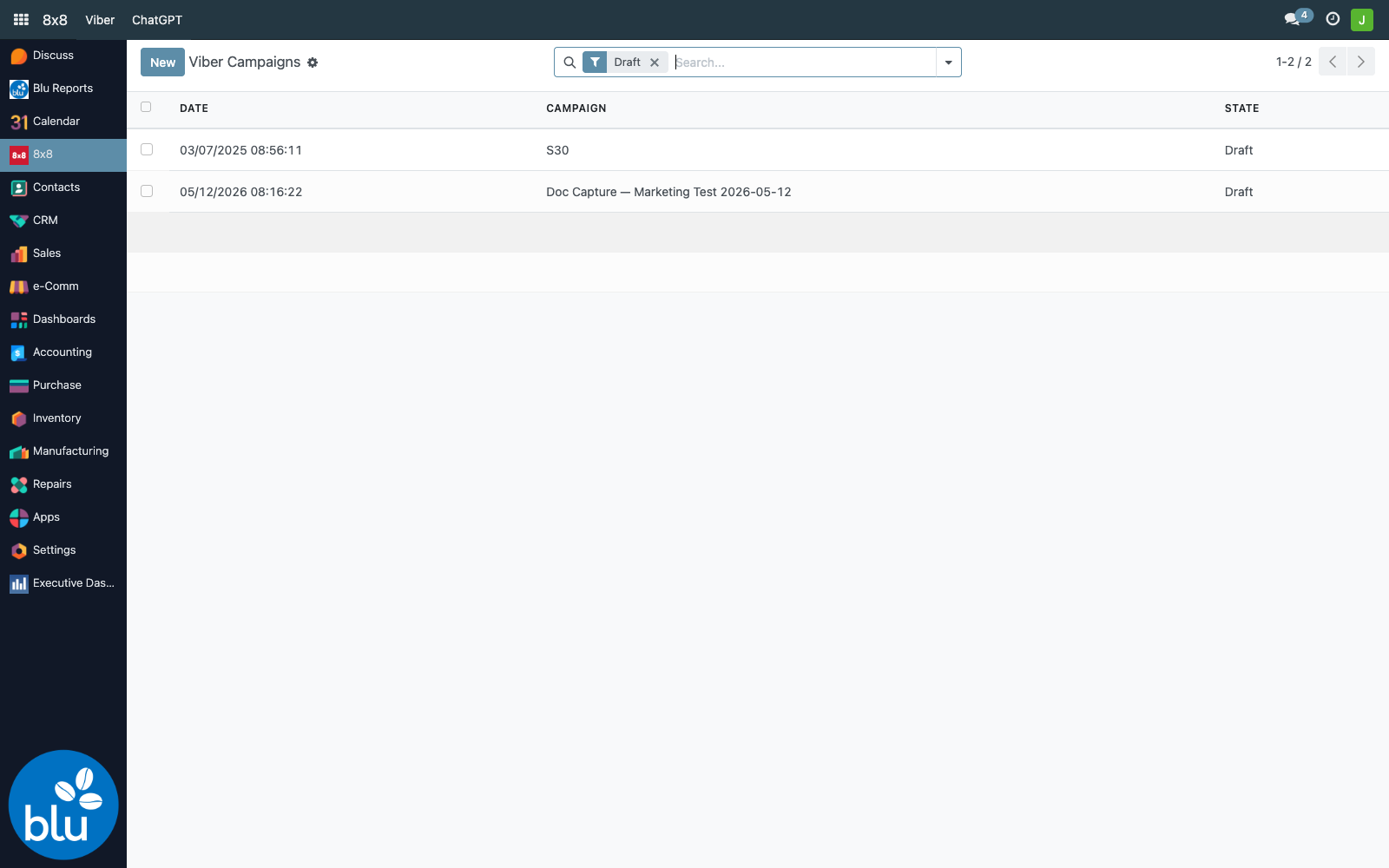
1. Open the campaigns list
8x8 → Viber → Campaigns — the list is filtered to Draft by default so in-progress work is front and centre.
2. Create a campaign
Click New. Fill in the campaign metadata at the top, then the content in the middle.
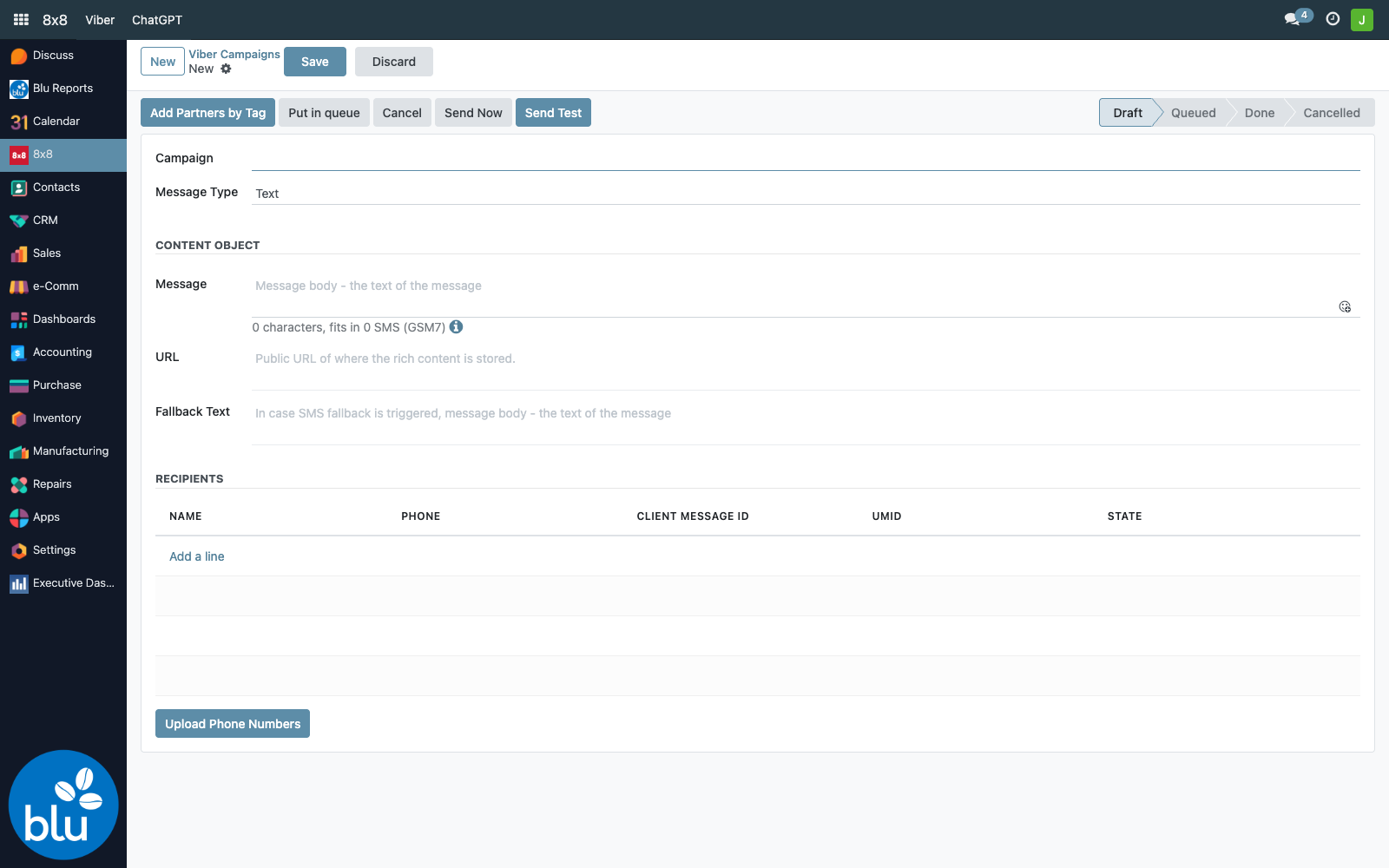
| Field | Notes |
|---|---|
| Campaign | A human-readable name. Used as the campaign's display label and shows up in cron logs. |
| Message Type | Text (most common), Image, Audio, Video, File. For non-Text types, URL is required and points at the asset hosted somewhere publicly reachable. |
| Message | The actual body. Supports SMS-style variable expansion; the character counter shows how it'd be split if Viber fell back to SMS. |
| URL | Public URL to the media asset (Image/Audio/Video/File). |
| Fallback Text | Sent when the recipient doesn't have Viber and the message falls back to SMS. Keep this readable on its own — the recipient may never see the rich content. |
| File details (Video/Audio only) | Thumbnail URL, file size in bytes, duration in seconds. Required by 8x8 for video/audio payloads. |
3. Add recipients
There are three ways to add recipients to the Recipients section at the bottom of the form:
- Add a line — pick an existing partner or just type a phone number directly. The composer auto-formats (
+639…) and prevents duplicate phones in the same campaign. - Add Partners by Tag (top of the form) — opens the Partner-Tag selection wizard; everyone with the selected tag is pulled in.
- Upload Phone Numbers (bottom of the form) — paste a list / upload a CSV of numbers (no partner record required).
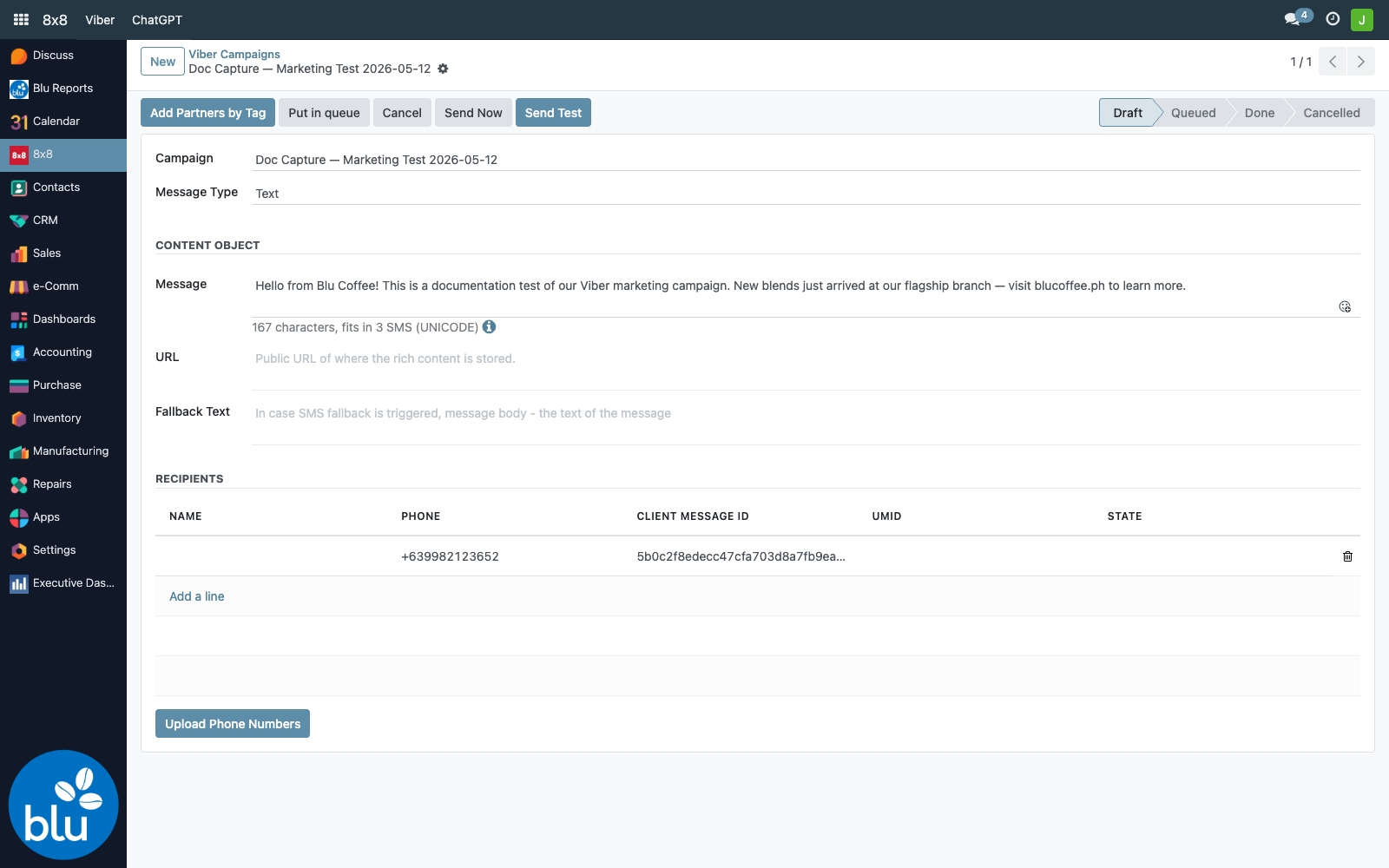
Each recipient row has four read-only columns the system fills in as the campaign runs:
| Column | Filled by |
|---|---|
| Client Message ID | Generated locally on create — a UUID that 8x8 echoes back so we can correlate webhook events to rows. |
| UMID | The 8x8-side message ID, returned by the POST response. Populated when 8x8 accepts the message. |
| State | Updated as 8x8 fires status webhooks: queued → sent → delivered → read (or failed). |
4. Send a test
Before blasting a real audience, click Send Test to fire one Viber to a phone you control. The wizard defaults to your own logged-in user's phone — override if needed.
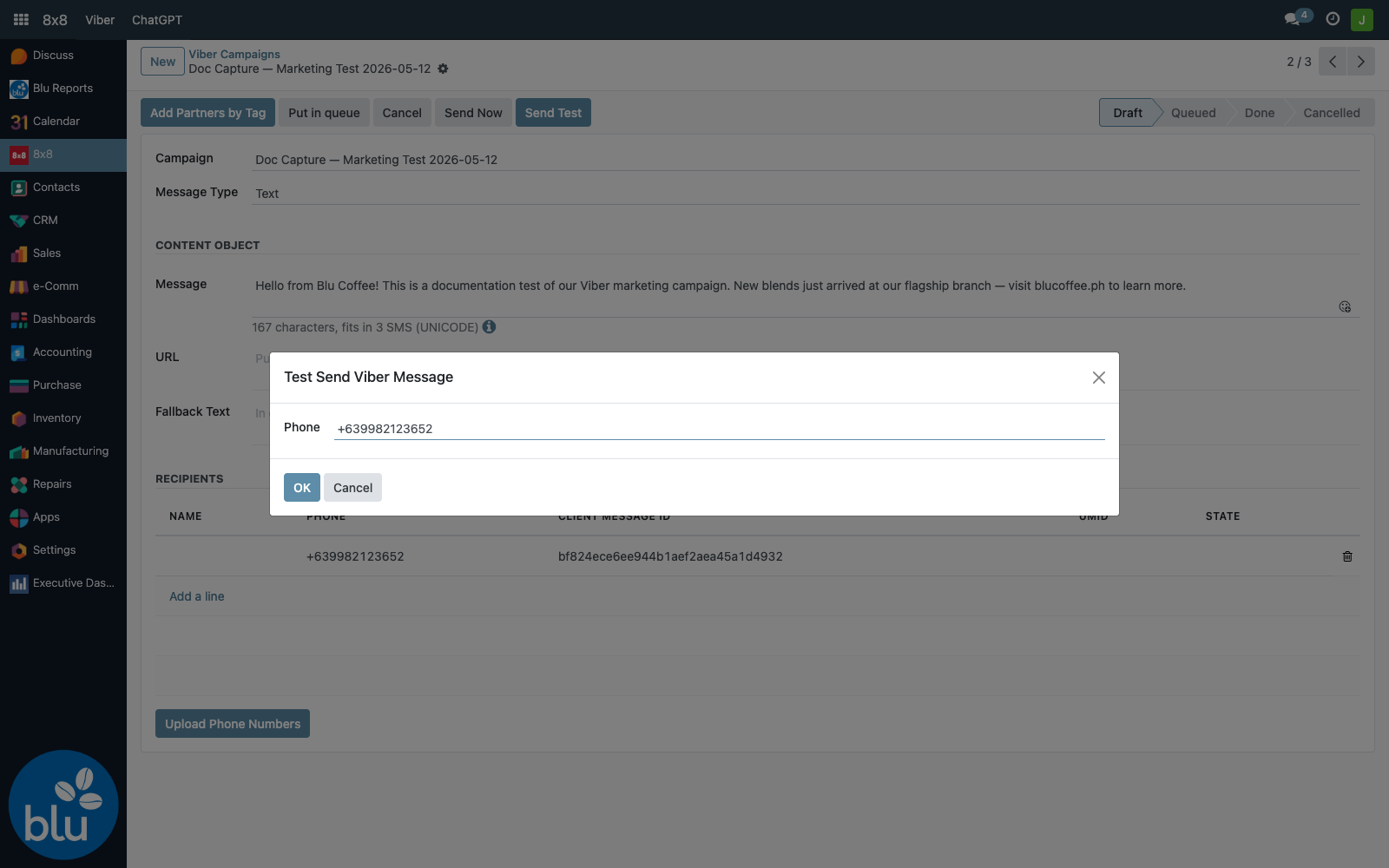
Click OK. The wizard posts a single payload to the Viber endpoint synchronously — you'll see "Sending Viber Message to +63…" in the server log, followed by 8x8's response containing the umid. Open Viber on the recipient phone to confirm content, formatting, image rendering, and the fallback link.
The test wizard sends to whatever number you type — it does not consume or mark anything in the campaign's recipient list. Run it as many times as you like before kicking off the real send.
5. Send the campaign
Two options on a saved Draft:
- Send Now — fires the messages immediately, one recipient at a time, sleeping for
Message Sending Intervalseconds between each. The form is locked from edits while it runs. - Put in queue — flips the state to Queued and returns control immediately. The Send Queued Viber Campaigns cron picks it up on its next run (every 1 minute) and sends the messages in the background. Use this for large lists or when sending should happen overnight.
Either path:
- Iterates each recipient in
partner_ids - POSTs a JSON payload to
https://chatapps.8x8.com/api/v1/subaccounts/<sub_account>/messages - Reads
umid+status.statefrom the 200 response and writes them to the recipient row - Commits the row, then sleeps for the configured interval before moving on
6. Track delivery
8x8 calls back into Odoo at POST /viber/status for every state change on every recipient (and for every inbound message). The handler in common/blu_8x8/controllers/controllers.py:
- On
outbound_message_status_changedevents, finds the matchingblu.viber.campaign.partnersrow byumidand updates itsstate. If every recipient in the campaign is now indeliveredorread, it flips the parent campaign to Done. - On
inbound_message_receivedevents, records the raw event inblu.viber.callback. If Da Vinci Mode is on, it also fires the AI intent detector (see below).
A separate cron — Checking Queued Viber Messages' UMID — runs every minute and re-checks queued campaigns, also bumping them to Done once all umids are populated.
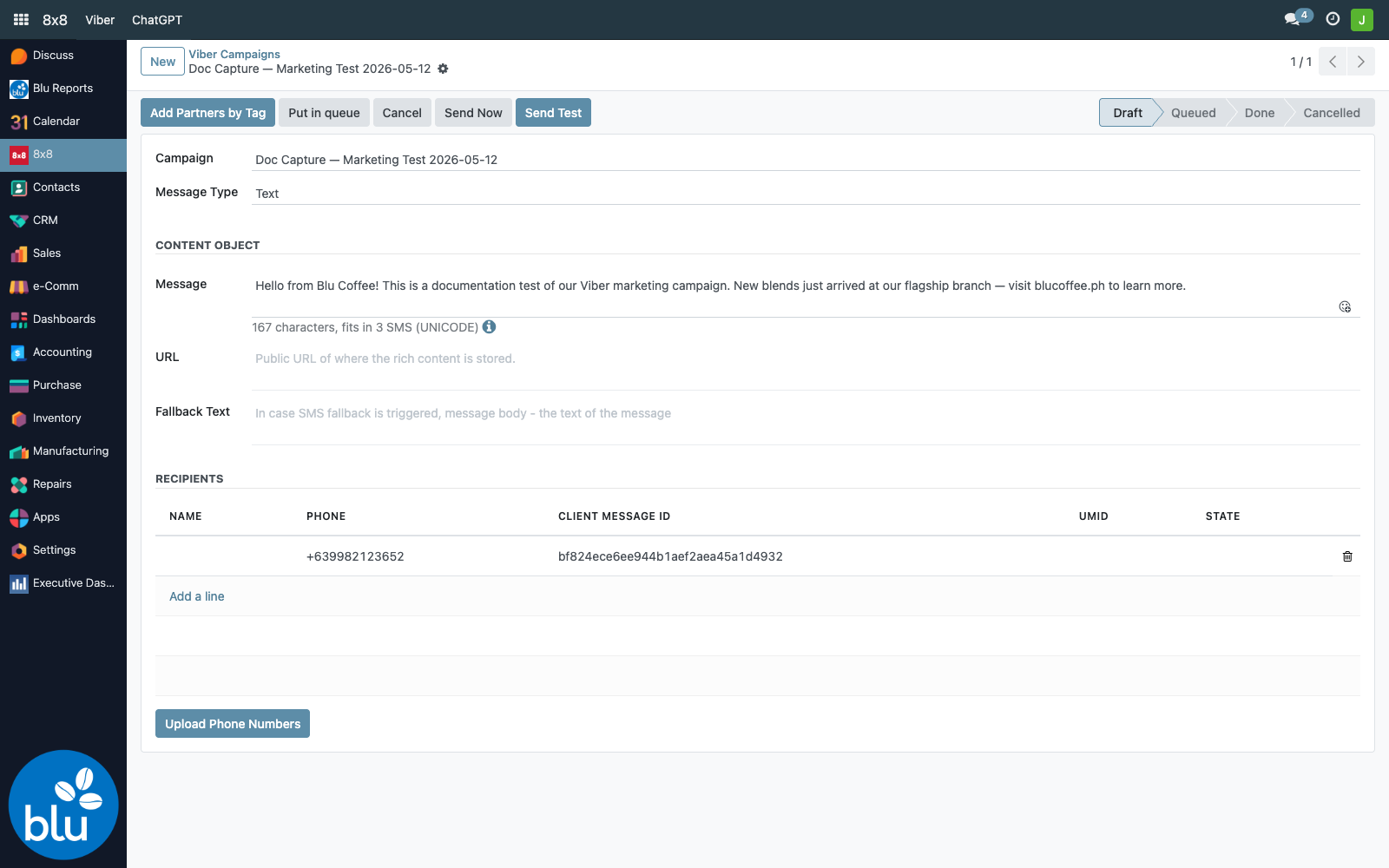
After clicking Send Now, expect umid to populate within seconds. The state column may take longer — it depends on Viber routing through to the recipient device. If a row stays blank for >5 minutes, check journalctl for the webhook handler and that 8x8 has the correct webhook URL on file (https://<your-host>/viber/status).
AI Chatbot for public Viber inquiries
When Respond to Viber's Incoming Message using ChatGPT is on, inbound Viber messages get an automatic ChatGPT-generated reply, grounded in a curated FAQ list.
Training data
The FAQ knowledge base lives in 8x8 → ChatGPT → Training Data Model. It's a flat list of Prompt → Completion pairs.
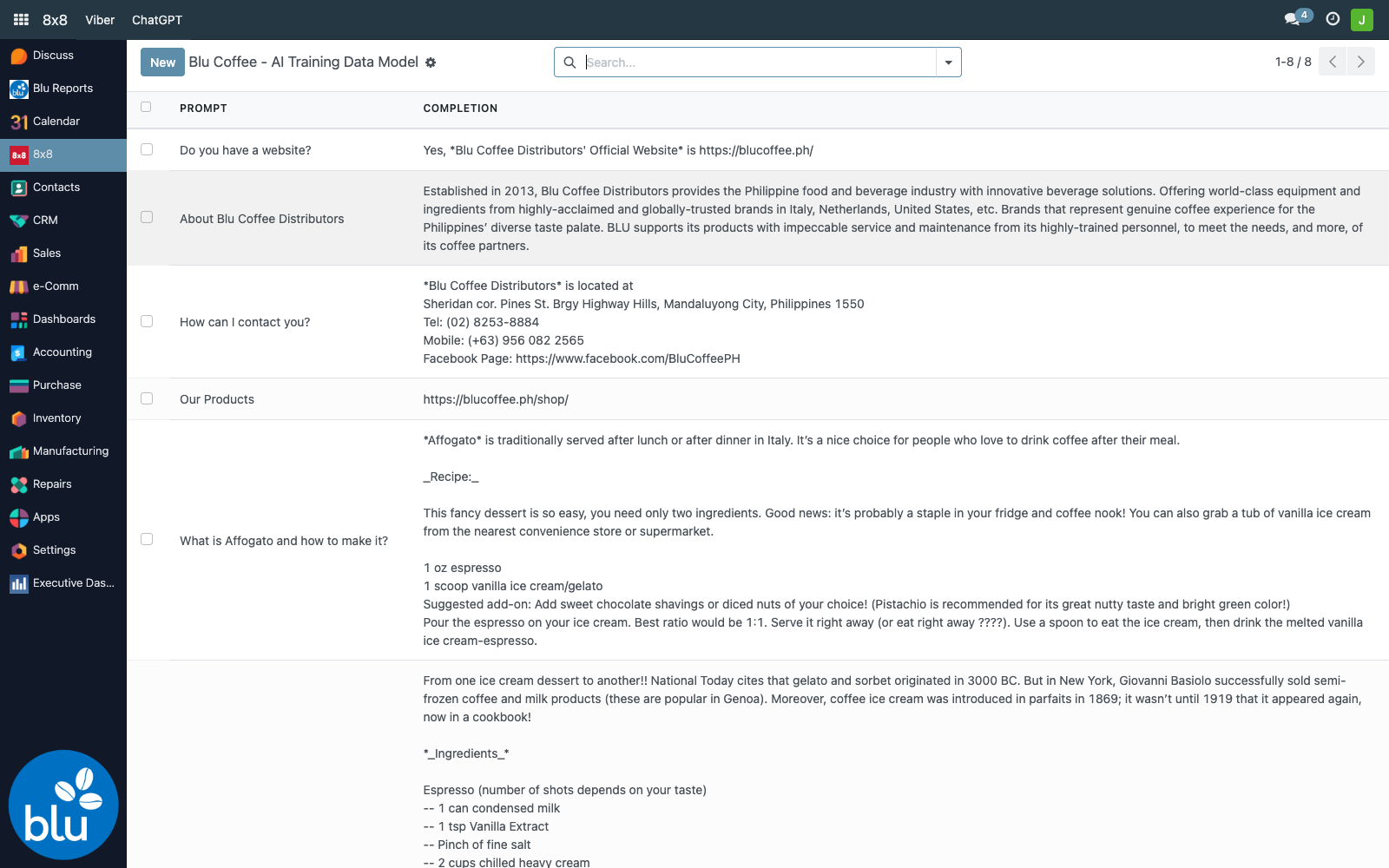
On every inbound Viber message, the entire training table is flattened into the AI system prompt:
(<bot persona, e.g. "You are a coffee expert at Blu Coffee Distributors.">
For frequently asked questions, use these responses:
'<prompt 1>' - '<completion 1>'
'<prompt 2>' - '<completion 2>'
...)
Then ChatGPT is called with messages = [<inbound message>, <system prompt>] and its response is sent straight back via Viber. So:
- Add a row = the bot can immediately answer that question.
- Edit a completion = the bot starts giving the new answer on the very next inbound, no deploy.
- Bot persona lives in Settings → 8x8 → "Respond to user like" — not in the training table.
What flows where
The reply is recorded as a blu.viber.campaign.partners row with is_ai_reply=True, so you can audit every AI answer.
AI intent → CRM lead
The Da Vinci Mode switch turns on a second pass on every inbound message: a separate ChatGPT call that just answers "is this message showing interest in our coffee products and services? Yes or No.".
When the answer is YES, the system:
- Creates a
crm.leadwith the inbound message text as the lead name and the sender's phone. If the phone already matches an existing partner (partial match onphonecolumn,+63and spaces normalised), the lead is auto-linked. - Looks up users in the "Can handle CRM from Viber and AI?" group — these are the agents you've designated as sales handlers.
- Sends each agent a Viber message with a "Yes, let me handle it." button, personalised with the customer's name (or phone if unknown) and the original inquiry text.
- The button's
action_urlpoints to/crm/<lead_id>/<user_id>— a public endpoint that:- If the lead is still unassigned, claims it for the clicking agent and renders an acknowledgement page.
- If another agent has already claimed it, shows a "this lead is being handled by
<agent>" page.
So the first agent to tap "Yes" wins the lead. The rest get a polite "already taken" page.
Whoever you add to Can handle CRM from Viber and AI? gets pinged on every AI-flagged inbound. Use this as a lightweight roster — add/remove users to control who's on rotation, no other config needed.
Lifecycle of an AI-created lead
- Created with
user_id= unset (anyone in the group can claim). - Claimed by the first agent who taps "Yes" —
user_idwritten, ack page rendered. - Worked normally from this point forward in the regular CRM pipeline. The lead has the original Viber message as its name, so the agent has full context at a glance.
SMS (sender accounts)
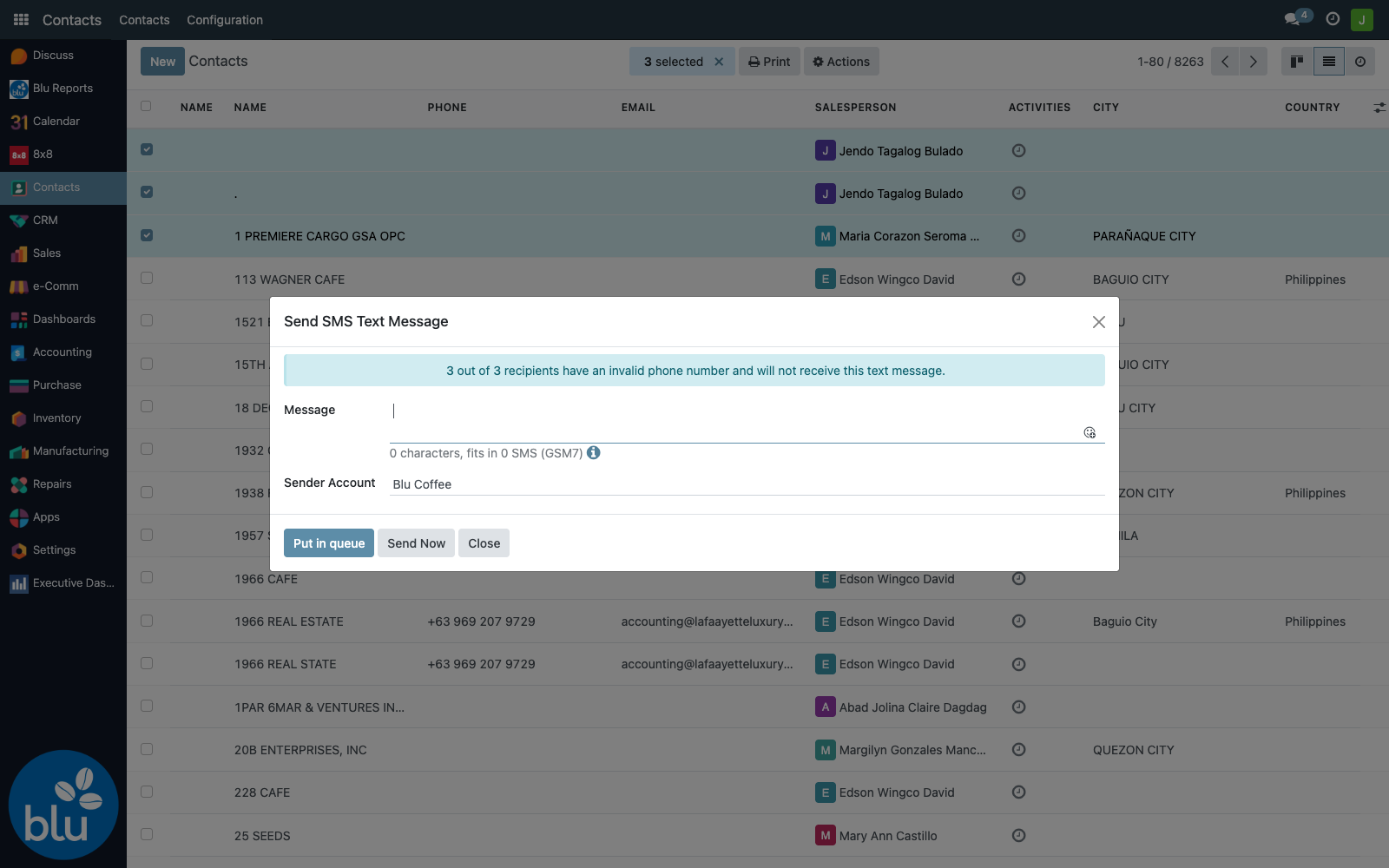
For SMS work — order confirmations, payment reminders, marketing blasts that need universal reach — Blu Coffee uses the standard Odoo SMS composer extended with a Sender Account selector. The selector tags each message with which Blu team it's from:
| Sender Account | Used for |
|---|---|
Blu Coffee (default) | General marketing — promos, holiday schedules, brand campaigns |
Blu Orders | Order confirmations and dispatch notices |
Blu Service | Service-team updates, machine repair pickup notices |
Blu Acctg | Statement reminders, payment received confirmations |
Blu Intrnal | Internal blasts (staff schedules, announcements) |
Sending follows the standard Odoo SMS flow — from a single contact's form via Actions → Send SMS Text Message, or in bulk by selecting rows in the contacts list.
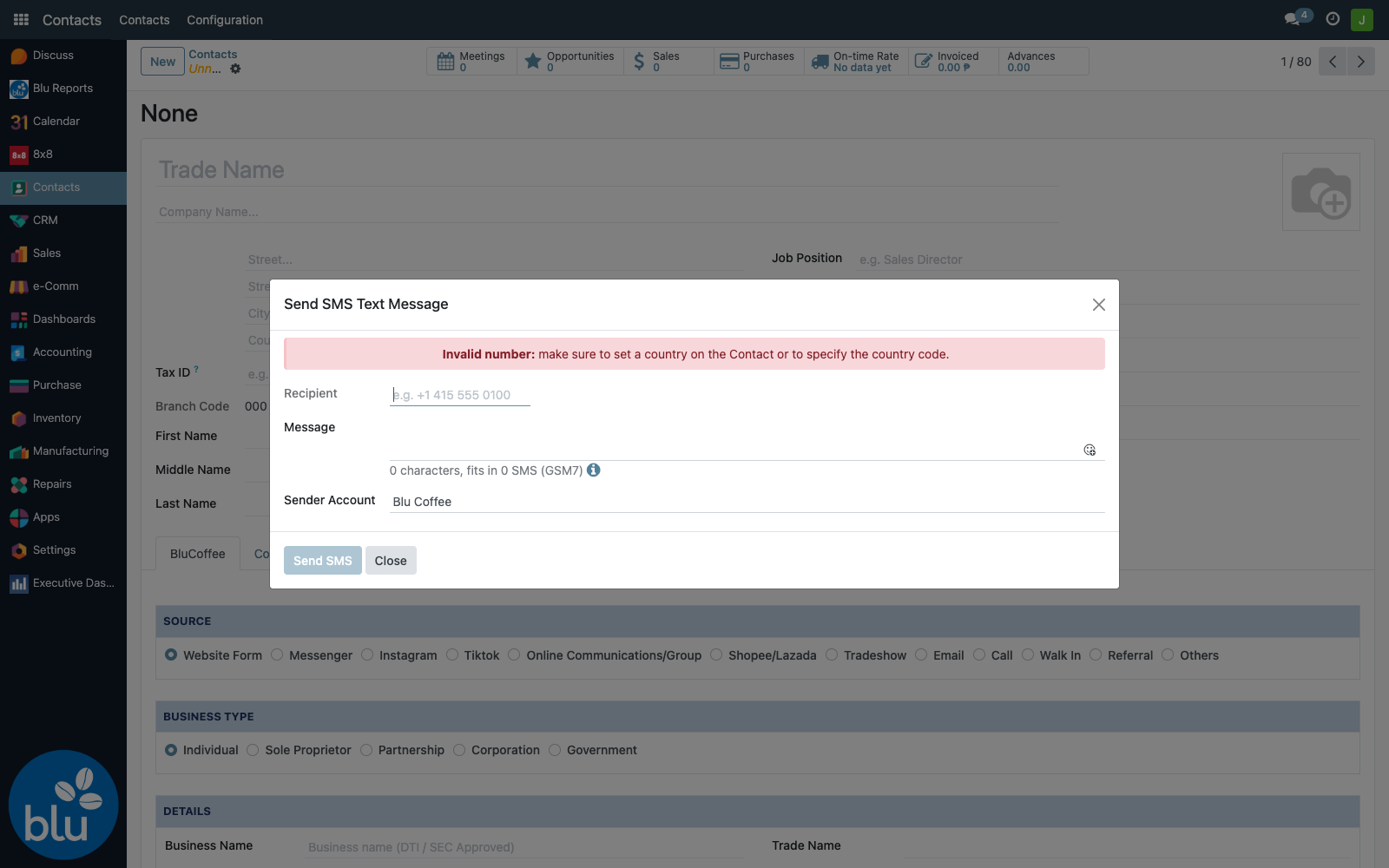
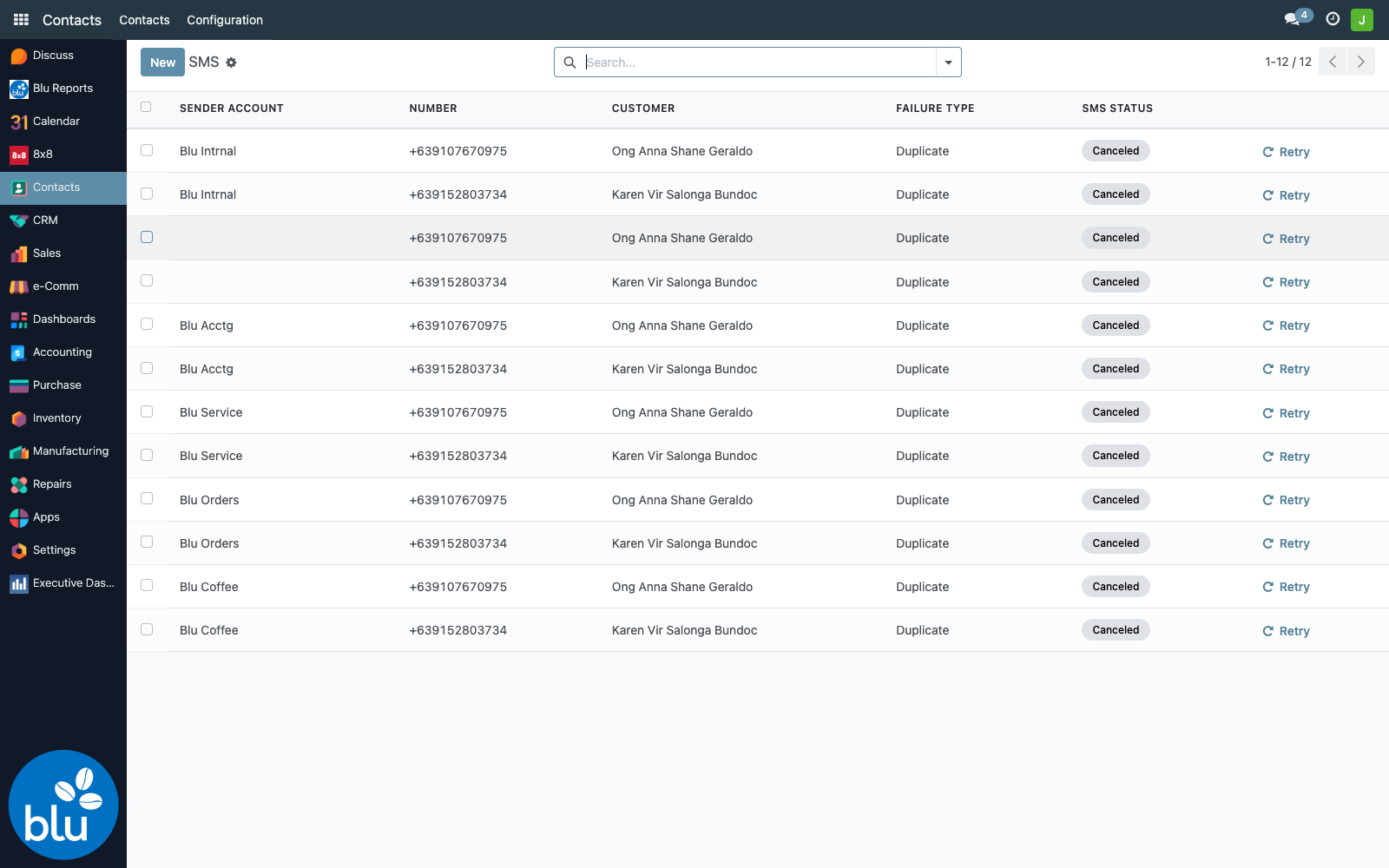
Sent messages are visible under Settings → Technical → Email → SMS Text Messages, with the Sender Account shown as a column so you can audit which team sent what.
Reference — code & data map
| Concern | File / location |
|---|---|
| Campaign model + send loop | common/blu_8x8/models/blu_viber_campaign.py |
| ChatGPT auto-reply on inbound | common/blu_8x8/models/blu_viber_callback.py |
| Intent detector + lead creation + agent fan-out | common/blu_8x8/models/blu_ai_training_data.py (decipher()) |
| Test-send wizard | common/blu_8x8/wizards/test_viber_send_wiz.py |
| Partner-by-tag picker | common/blu_8x8/wizards/partner_tags_wiz.py |
| Bulk phone upload | common/blu_8x8/wizards/upload_phone_numbers_wiz.py |
| Webhook endpoint + lead-claim endpoint | common/blu_8x8/controllers/controllers.py |
| Settings page | common/blu_8x8/models/res_config_settings.py, views/res_config_settings_view.xml |
| Menus + groups + crons | common/blu_8x8/views/blu_8x8_views.xml |
| AI training data UI | common/blu_8x8/views/blu_ai_views.xml |
| Ack / "already taken" page templates | common/blu_8x8/reports/blu_crm_ack_template.xml |
SMS sender_account field + composer | bc17/blu_8x8/tools/sms_8x8.py, wizard/sms_composer_view.xml |
Crons
| Cron | Frequency | Purpose |
|---|---|---|
| Send Queued Viber Campaigns | every 1 min | Sends any campaign in Queued state |
| Checking Queued Viber Messages' UMID | every 1 min | Flips a campaign to Done once every recipient has a UMID populated |
Webhook URLs
| URL | Method | Auth | Purpose |
|---|---|---|---|
/viber/status | POST | public | 8x8 delivery + inbound webhook |
/crm/<lead_id>/<user_id> | GET | public | Lead-claim button target (rendered HTML response) |
ir.config_parameter keys
| Key | Default | Notes |
|---|---|---|
blu_8x8.blu_8x8_api_key | — | 8x8 bearer token |
blu_8x8.account_id | BluCoffeePH | informational |
blu_8x8.blu_8x8_messaging_app_subaccount_id | BluCoffeePH_TwoWayViber_NOTIF | Viber sub-account |
blu_8x8.sms_subaccount_id | BluCoffeePH_NOTIF | SMS sub-account |
blu_8x8.blu_8x8_sending_interval | 5 | seconds between Viber sends in a campaign |
blu_8x8.blu_chatgpt_api_key | — | OpenAI bearer token |
blu_8x8.blu_chatgpt_model | gpt-4o | OpenAI model name |
blu_8x8.blu_chatgpt_max_completion_tokens | 100 | reply length cap |
blu_8x8.blu_chatgpt_respond_to_viber_message | False | master AI reply switch |
blu_8x8.blu_chatgpt_bot_type | "You are a coffee expert at Blu Coffee Distributors." | system-prompt persona |
blu_8x8.blu_chatgpt_davinci_mode | False | intent → CRM-lead switch |