Sales Order Process & Viber Send
The Blu Coffee sales pipeline runs on Odoo's standard sale.order model, extended with the operational guardrails the team needs day-to-day:
- A required Mode of Payment so every quote already carries the receivable account it'll post against.
- Validator-only Confirm — the green button is replaced with a custom action that gates discount-bearing quotes behind a special-pricing approver group.
- SLA tracking — region-aware target days and a live On Time / At Risk / Delayed badge on every confirmed order.
- Send to Viber — fire the quote as a Viber chat message with a "View Quotation" button, in addition to email.
- Force Close — when a sale won't be invoiced, an authorized user closes the SO with a recorded reason instead of cancelling.
The plumbing lives in two places:
| Module | Provides |
|---|---|
bc17/blu_crm_sales/ | Mode of Payment, custom Confirm, Force Close wizard, list-view tweaks, custom TikTok print, sale-order-line On-Hand + Total Weight columns |
common/sla_sales_tracking/ | SLA fields, working-day math, region-based target lookup |
common/blu_8x8/ (blu_viber_sale_order.py) | Send to Viber button on the SO form |
Lifecycle
Cancel is non-destructive (no inventory or accounting impact) and only available before invoicing. Force Close is the safety valve for confirmed orders that have already moved inventory but won't be invoiced — see Force Close below.
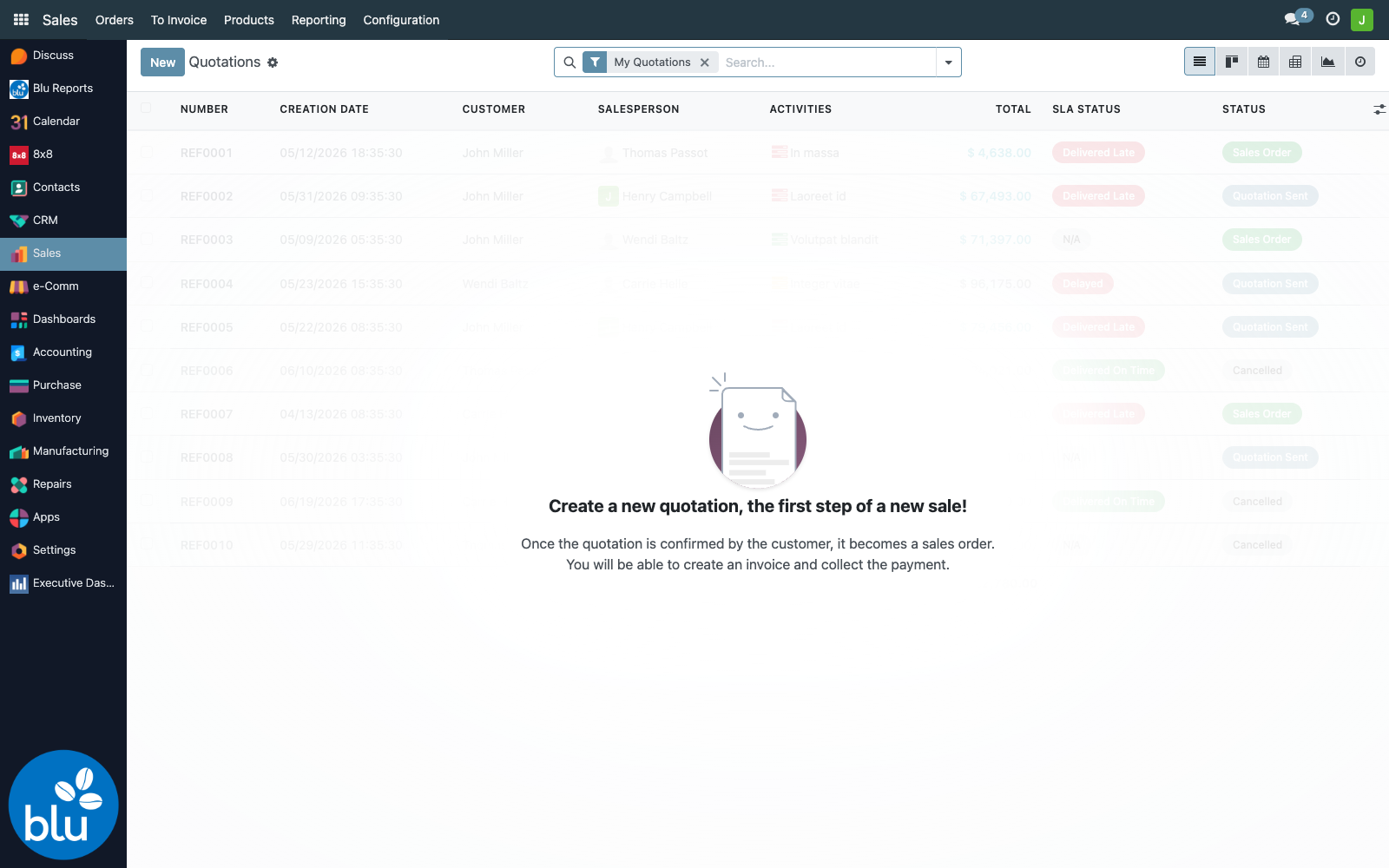
Quotation list
Sales → Orders → Quotations opens the standard quotation list, with SLA columns layered on by sla_sales_tracking:
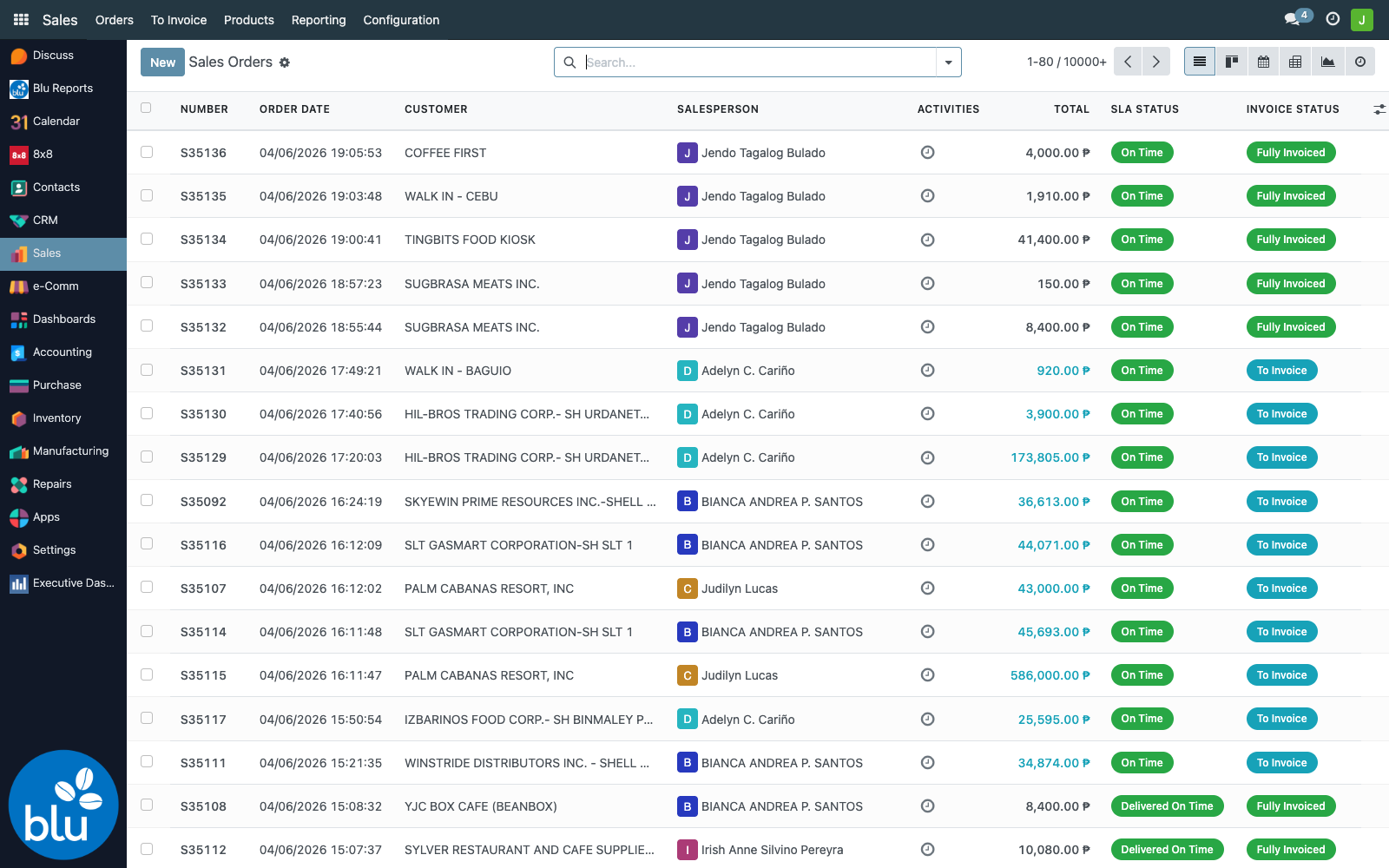
Once confirmed, Sales → Orders → Orders shows the live SO list. The SLA Status column is shown by default; Expected Delivery and Days Remaining are optional columns you can toggle on:
The form at a glance
Open any draft and you'll see the customised header:
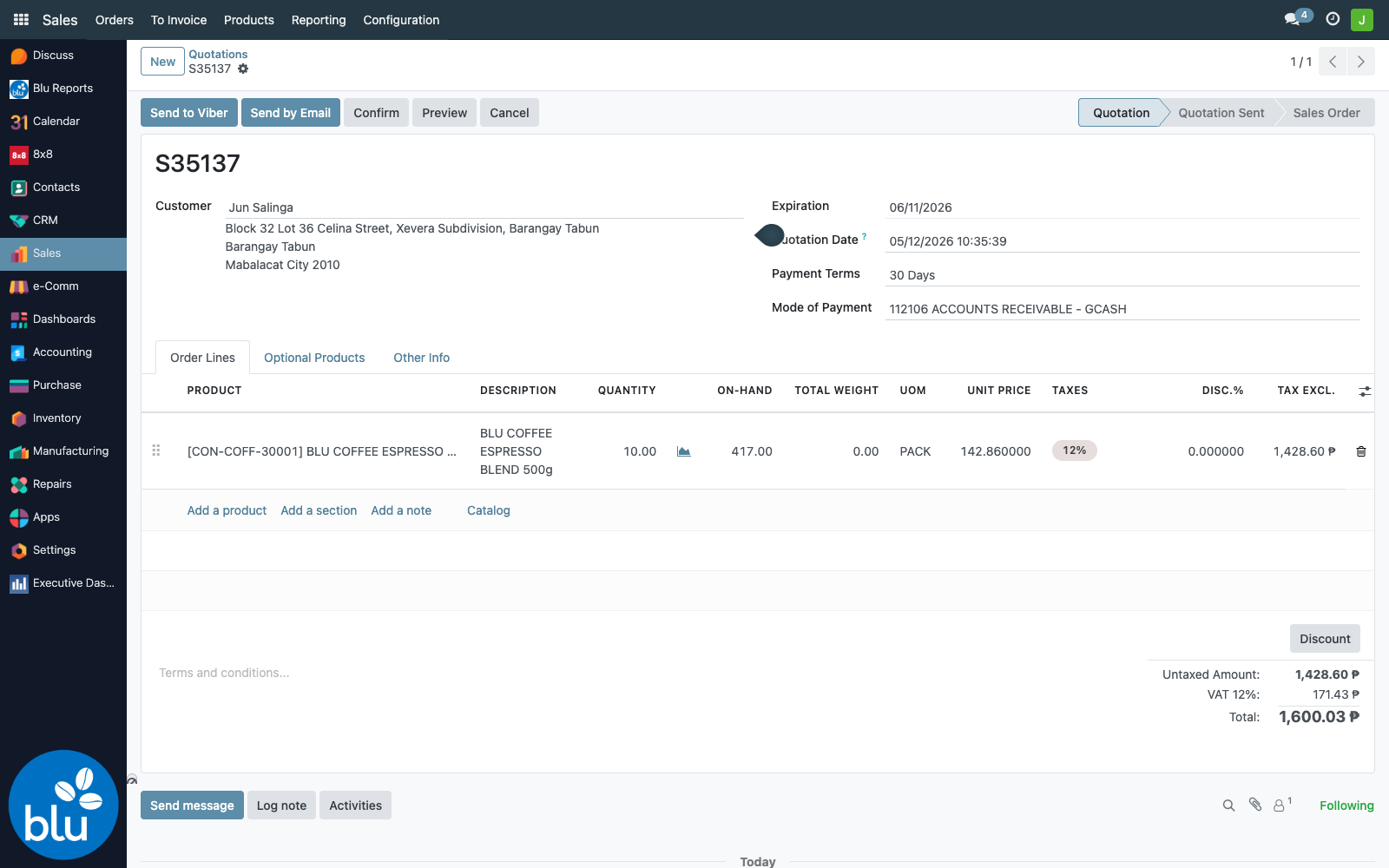
| Element | Where it comes from | Notes |
|---|---|---|
| Send to Viber button | common/blu_8x8 | Posts the quote as a Viber buttoned message to partner_id.phone. See Send to Viber below. |
| Send by Email button | Standard Odoo | Exposed regardless of permission group (recent change) — recipient is partner_id.email. |
| Confirm button | bc17/blu_crm_sales (rts_action_confirm) | Replaces Odoo's default. Visible only to validator + ecomm groups. If any line has discount > 0, an extra special-pricing group check fires. |
| Cancel button | Standard, gated with a confirmation dialog ("Click OK button to confirm Cancel action") | |
| Mode of Payment field | bc17/blu_crm_sales (account_id) | Required. Domain limited to receivable / cash accounts flagged sales_mop_account=True. |
| Payment Terms field | Standard, but marked required="1" by bc17 | |
Order line On-Hand column | bc17/blu_crm_sales (qty_available) | Live stock display for the line's product, related to product.qty_available. |
Order line Total Weight column | bc17/blu_crm_sales (total_weight) | Computed = product_uom_qty × product.weight. |
The custom Confirm includes warehouse-defaulting logic — on confirm, every draft picking gets its source location set to the logged-in user's default_warehouse_id.lot_stock_id. This is how the team routes deliveries to the right branch warehouse without a separate step.
Mode of Payment
Each quote must declare where the receivable will post. The picker is restricted to accounts tagged sales_mop_account=True so reps can't accidentally select an arbitrary GL account:
112101 ACCOUNTS RECEIVABLE— default cash receivable112105 ACCOUNTS RECEIVABLE - TIKTOK112106 ACCOUNTS RECEIVABLE - GCASH112108 ACCOUNTS RECEIVABLE - PAYPAL112109 ACCOUNTS RECEIVABLE - XENDIT112110 ACCOUNTS RECEIVABLE - SHOPEE- …and one per active payment-provider integration
The field is tracking=True so changes are logged in chatter.
SLA tracking
Every confirmed SO gets a Service Level Agreement group inside the form, comparing the order date against the customer's region delivery target:
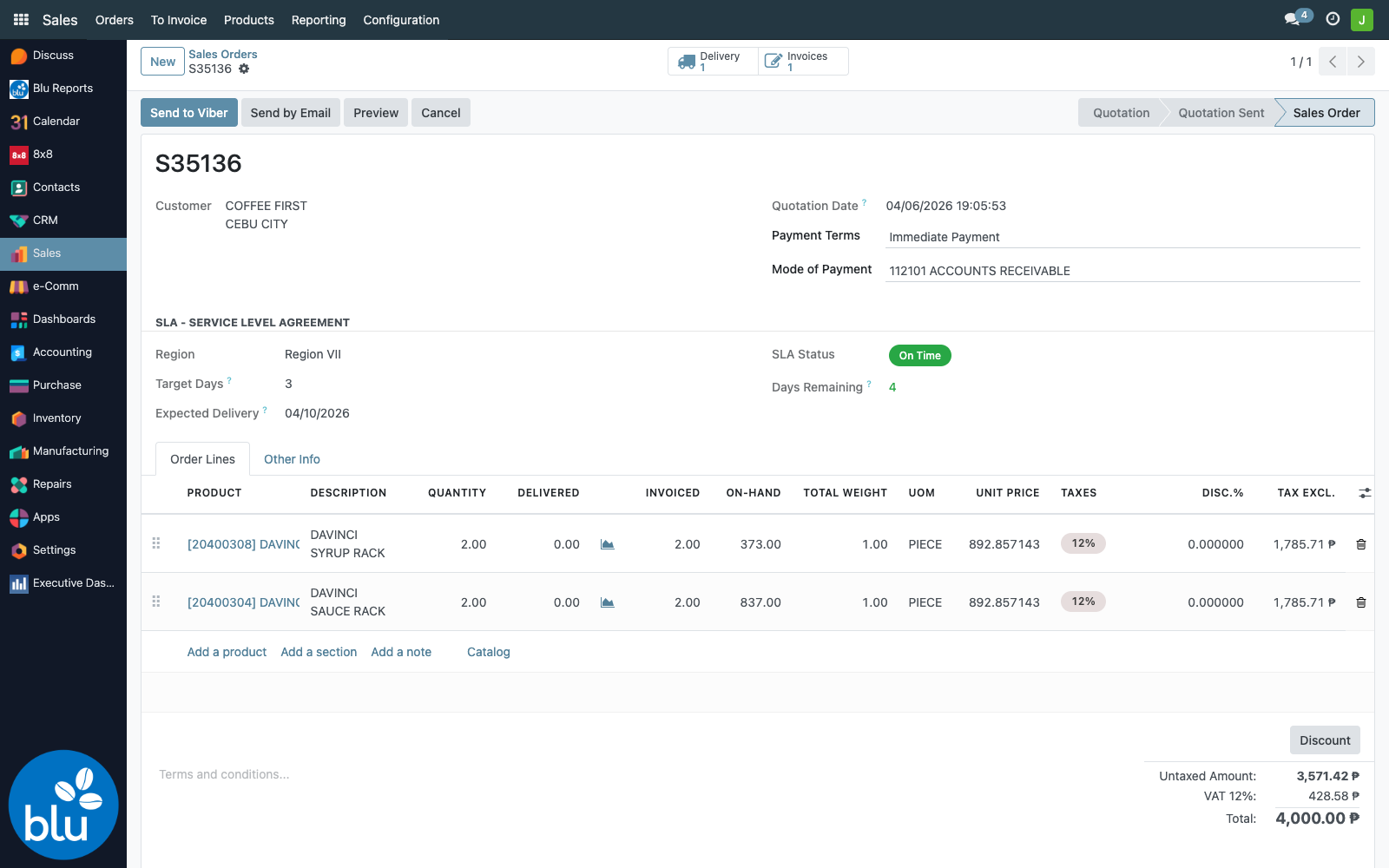
Fields
| Field | Computed from |
|---|---|
| Region | partner_id.region_id.region_name (related, stored) |
| Target Days | partner_id.region_id.delivery_time (working days), with fallbacks: NCR (region code 130000000) → 4 days; everywhere else → 12 days |
| Expected Delivery | date_order + target_days, skipping weekends and entries in the sla.holiday model |
| Actual Delivery | Date the last outgoing picking went to state done |
| SLA Status | One of: On Time, At Risk, Delayed, Delivered On Time, Delivered Late, N/A |
| Days Remaining | Working days from today to Expected Delivery (negative = overdue) |
| Variance (Days) | Working days between Actual and Expected (positive = early, negative = late) |
Status logic
Search filters
The Quotations / Orders search bar gets five state filters and two group-bys courtesy of sla_sales_tracking:
| Filter | What it shows |
|---|---|
| On Time | Confirmed SOs still within their SLA window with >2 days to spare |
| At Risk | Confirmed SOs with ≤2 working days remaining |
| Delayed | Confirmed SOs past their Expected Delivery with no completed picking |
| Delivered On Time | Closed orders that hit the window |
| Delivered Late | Closed orders that missed it |
Plus group-bys for SLA Status and Region — useful for weekly sales-ops reviews.
The numbers come from res.region.delivery_time. To change the target for a whole region, update it there — every existing SO for partners in that region recomputes on its next save. There's no need to touch SOs one-by-one.
Current settings: NCR / Region III / CAR / Region VII = 3 working days, all other regions = 5 working days.
For the full configuration walkthrough — region SLA editing, holiday management, customer-region prerequisites, and the hardcoded fallbacks — see Inventory → Delivery Orders SLA → Configuration.
…and on every Delivery Order
The same SLA badge now appears on outgoing pickings in Inventory → Operations → Transfers, so warehouse and dispatch staff can spot at-risk deliveries without opening the underlying SO. The picking-side fields are stored related copies of sale_id.sla_*, so there's only one source of truth.
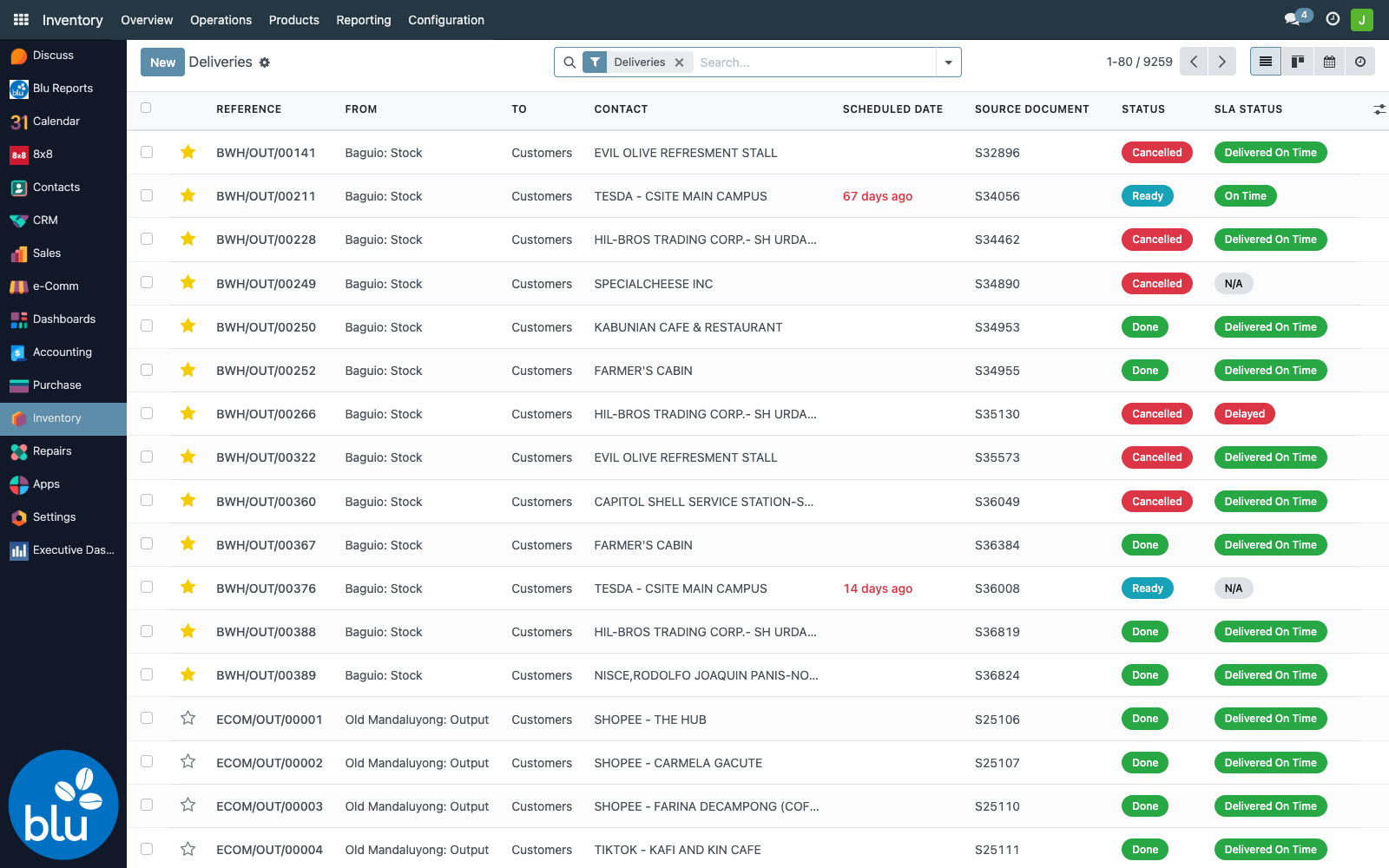
See Inventory → Delivery Orders SLA for the column toggles, filters, and dispatcher workflow.
Send to Viber
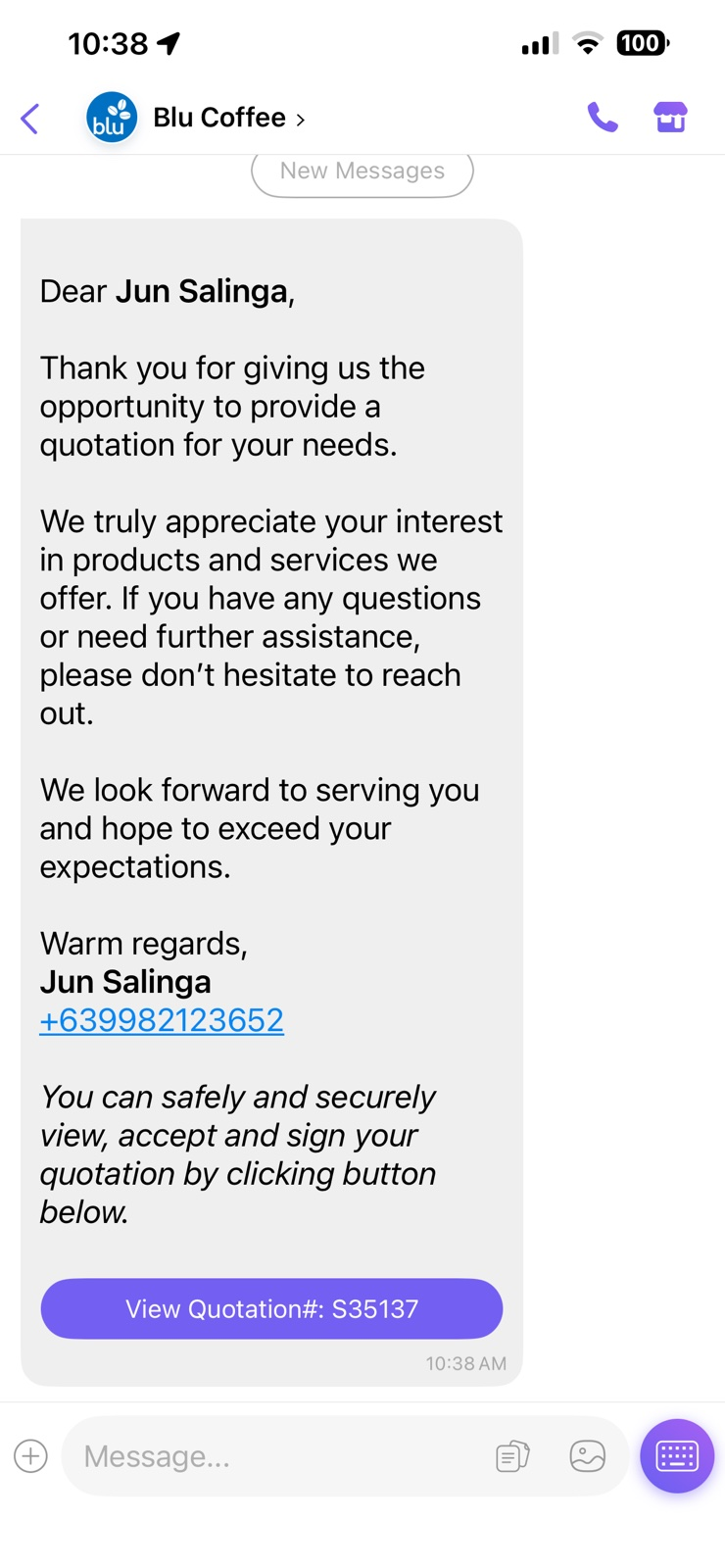
The Send to Viber button lets a salesperson push the quote straight to the customer's Viber number. It reuses the 8x8 messaging sub-account already configured for marketing campaigns — there's no separate setup.
What it does
- Reads
partner_id.phone, validates and sanitises to E.164 (+639xxxxxxxxx). - Generates the standard Odoo customer-portal preview URL for the quote (
action_preview_sale_order()['url']). - POSTs a Viber
buttonspayload tohttps://chatapps.8x8.com/api/v1/subaccounts/<messaging_sub_account>/messages:- Greeting personalised with the customer's name.
- Salesperson's signature with their own phone number.
- View Quotation#:
<SO name>button → portal preview URL.
- On 200 OK, logs the response UMID as a
blu.viber.campaign.partnersrow (so delivery webhooks update its state alongside marketing-campaign messages) and posts a chatter line.
What the customer receives
The customer's journey is two taps — Viber message arrives on their phone, they tap the button, and they're on Odoo's standard public portal where they can review, accept, sign, or reject:
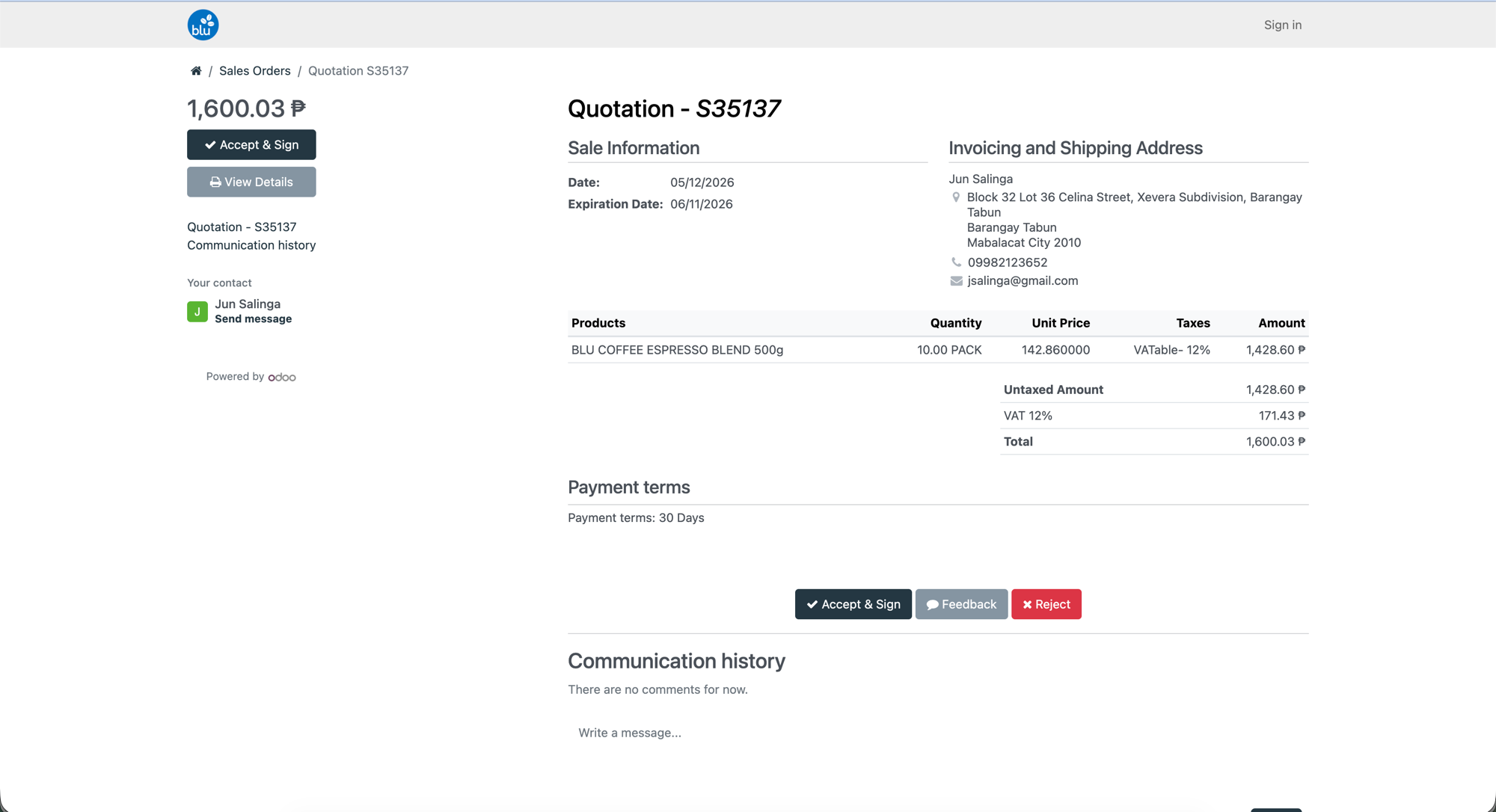
The portal page is fully self-serve — the customer can:
- Accept & Sign electronically (top-left on mobile, bottom-centre on desktop) to confirm the quotation. The SO state flips to Sale Order on Odoo's side immediately.
- View Details to drill into product lines or download the PDF.
- Feedback to add a comment that lands in the SO's chatter.
- Reject to decline (the SO state moves to Cancelled).
They don't need an Odoo login — the portal URL carries the access token from the chat-button payload.
What the SO records
Right after the click, the SO's chatter logs the send so the sales manager can see at a glance that the quote went out:
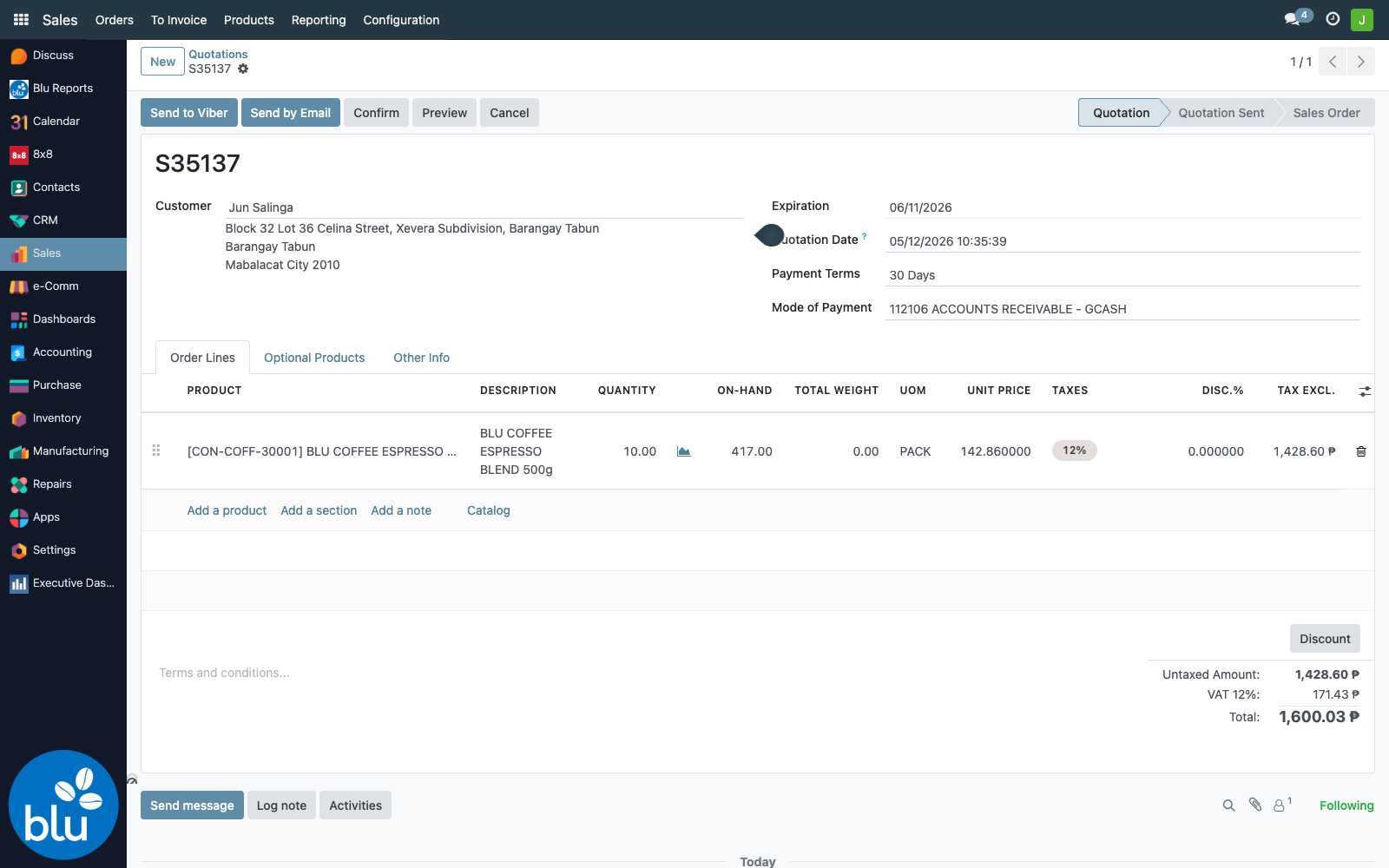
The chatter entry includes the Viber Message ID (UMID) — same identifier the marketing-campaign delivery webhook uses. Once 8x8 fires the corresponding outbound_message_status_changed event, the matching blu.viber.campaign.partners row's state updates to queued → sent → delivered → read.
If partner_id.phone is missing or unparseable, the action raises <Customer> has no valid Viber/Phone Number and the SO state is unchanged. No partial send happens — clean up the contact first, then retry. Tip: Viber numbers go in the Phone field, not Mobile.
Confirm — and the special-pricing gate
The standard green Confirm button is replaced with rts_action_confirm(). The custom action does three things:
- Special-pricing check — if any line has
discount > 0, the user must be inbc17.blu_sales_order_special_pricing_validators_group, otherwise it raises "You are not allowed to confirm quotations with special pricing." - Confirm visibility — the button itself is only rendered for users in
blu_sales_order_validators_group, the special-pricing validators, or the ecomm admin/user groups. Rank-and-file salespeople can build quotes but not confirm them. - Warehouse routing — after
action_confirm(), every draft / confirmed / assigned picking is rewritten to the user'sdefault_warehouse_id.lot_stock_idso deliveries are pulled from the correct branch warehouse without a manual step.
A pre-confirm dialog ("Click OK button to confirm your action") fires on every press to prevent fat-finger commits.
unlink() (delete) is similarly blocked for validator-group users — once a quotation has been built, only non-validators can delete it (which in practice is rare; validators are the sales managers, so deletes are pushed back to the salesperson who created the quote).
Force Close — when a sale won't be invoiced
Sometimes inventory has shipped and a final invoice still won't happen — a swap, a goodwill write-off, a discontinued customer. Cancelling isn't right (the moves happened), so the team uses Force Close:
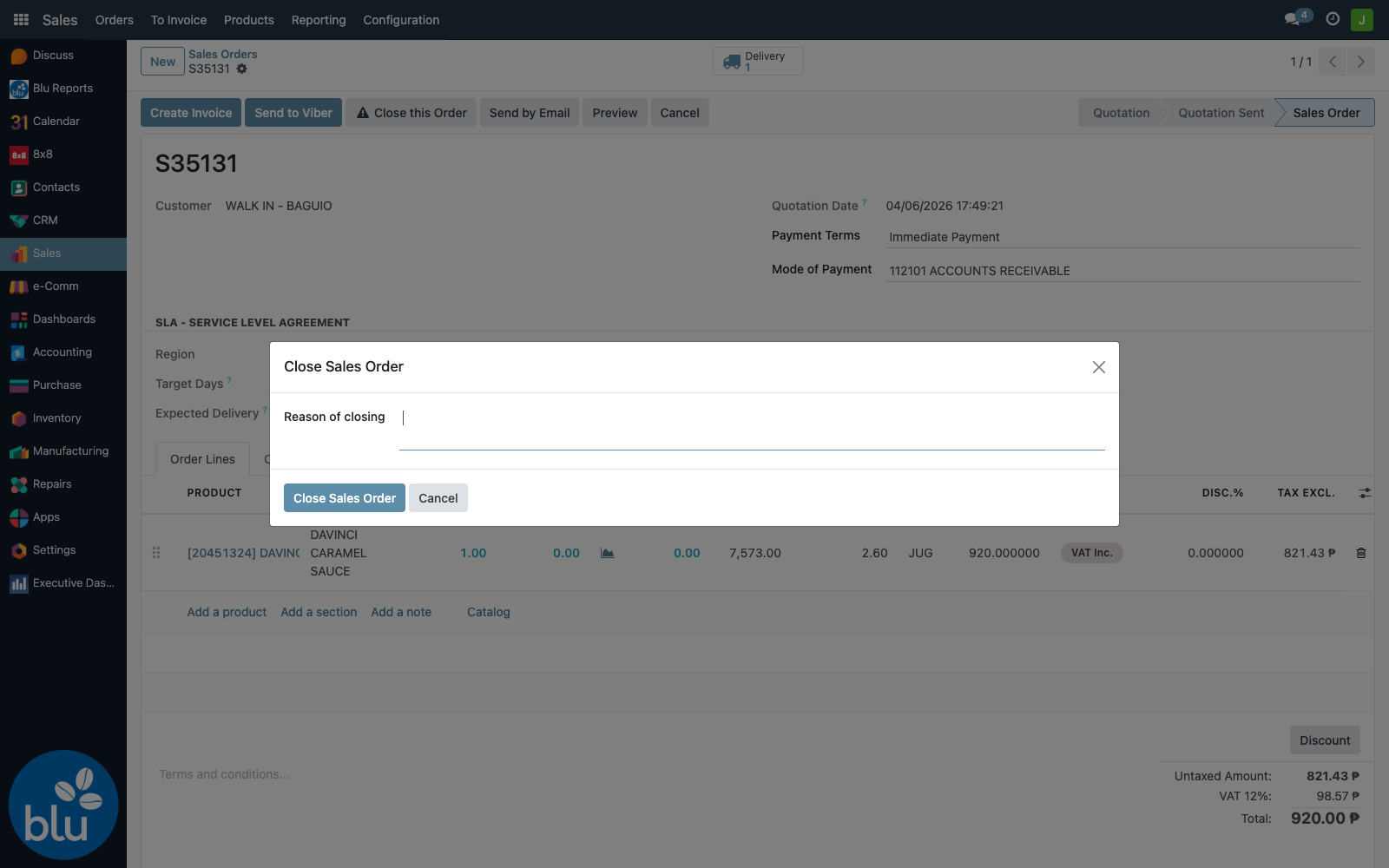
The Close this Order button (with the ⚠️ icon) is only visible when invoice_status == 'to invoice' — i.e. there are lines still expecting an invoice. Clicking it opens a wizard that requires a reason before proceeding.
When confirmed, the action:
- Sets
invoice_status = 'no'on the SO and on every line whose status was'to invoice'. - Stores the reason on the SO (
force_close_so_reason). - Stamps
force_close = True, the closer's user_id (force_close_uid), and the timestamp (force_close_date). - Posts a chatter line: "Forced closing of Sales Order:
<reason>".
After that, the SO disappears from invoicing queues. The reason and closer are stored in tracking fields, so an auditor can find them on any closed order.
SQ & SO Dates List
bc17/blu_crm_sales adds a sales reporting list at Sales → Reporting → SQ & SO Dates List that returns a read-only, tightly-columned view of every confirmed sale (state = sale). It's filtered to Sale Order state by default and is create=False, edit=False, delete=False — designed for reviewing the dates pipeline, not for editing.
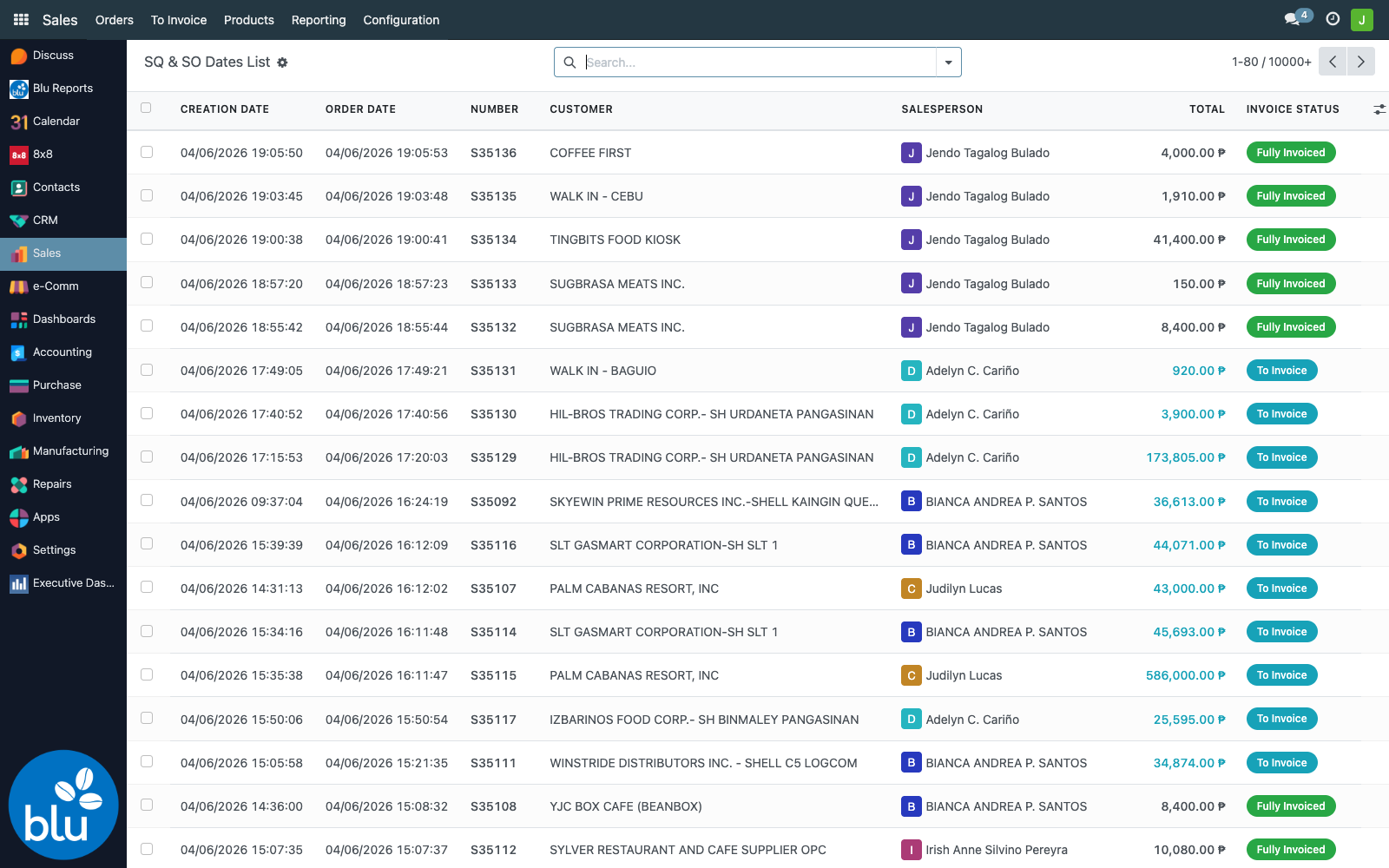
It surfaces:
- Create date, order date, commitment date, expected date
- Order number, customer, salesperson, team
- Invoice status with colour badges (Fully Invoiced / To Invoice / Upselling)
- Tags, untaxed / tax / total amounts
Reference — code & data map
| Concern | File |
|---|---|
sale.order extension (account_id, force_close, rts_action_confirm, default warehouse, TikTok print) | bc17/blu_crm_sales/models/sale_order.py |
sale.order.line extension (qty_available, total_weight) | bc17/blu_crm_sales/models/sale_order_line.py |
| Force close wizard | bc17/blu_crm_sales/wizard/force_close_so_wizard.py |
| SO form patches (Mode of Payment, custom Confirm, Close this Order button) | bc17/blu_crm_sales/views/sale_order_view.xml |
| SQ & SO Dates List + custom list view | bc17/blu_crm_sales/views/quotation_order_view.xml |
| SLA fields + working-day calculations | common/sla_sales_tracking/models/sale_order.py |
| SLA list/form/search view patches | common/sla_sales_tracking/views/sale_order_views.xml |
SLA on stock.picking (related fields) | common/sla_sales_tracking/models/stock_picking.py |
| Delivery-Orders tree + search inherit | common/sla_sales_tracking/views/stock_picking_views.xml |
| Holiday lookup for working-day math | common/sla_sales_tracking/models/sla_holiday.py |
| Send to Viber action | common/blu_8x8/models/blu_viber_sale_order.py |
| Send to Viber button injection | common/blu_8x8/views/blu_viber_sale_order_views.xml |
Groups used
| Group | Effect |
|---|---|
bc17.blu_sales_order_validators_group | Sees Confirm button, Close this Order button. Cannot delete SOs. |
bc17.blu_sales_order_special_pricing_validators_group | Same as above + can confirm quotes with discounted lines. |
bc17.blu_sales_invoicing_group | Sees Create Invoice + Create Invoice Percentage buttons. |
bc17.blu_ecomm_admin_group / bc17.blu_ecomm_user_group | Can confirm + invoice ecomm orders. |
Custom sale.order fields
| Field | Type | Notes |
|---|---|---|
account_id | Many2one (account.account) | Mode of Payment, required, tracked |
force_close | Boolean | True after Force Close wizard fires |
force_close_so_reason | Text | Reason captured in wizard |
force_close_date | Datetime | When it was closed |
force_close_uid | Many2one (res.users) | Who closed it |
is_ecomm_sale | Boolean | Set by ecomm flow on create |
sla_target_days | Integer | Region-based |
sla_expected_delivery_date | Date | Computed |
sla_actual_delivery_date | Date | From done outgoing pickings |
sla_status | Selection | on_time/at_risk/delayed/delivered_on_time/delivered_late/not_applicable |
sla_days_remaining | Integer | Working days |
sla_days_variance | Integer | Working days; positive = early |
sla_region_name | Char (related) | From partner's region |